This is best Fabric, Power BI, SQL and AI community event. How do we know? The last event sold out! Save €200 with code FABCMTY200.
Register nowA new Data Days event is coming soon! This time we’re going bigger than ever. Fabric, Power BI, SQL, AI and more. Don't miss out.
I would like to group data into buckets based off the number of days from which the data is ran. Here is a sample of what my data looks like.
| PMT_AMOUNT | CHECK_DATE |
| $10.00 | 9/5/2017 |
| $75.00 | 2/25/2018 |
| $100.00 | 5/7/2018 |
| $200.00 | 1/11/2018 |
| $60.00 | 3/5/2018 |
| $15.00 | 10/11/2017 |
| $150.00 | 12/12/2017 |
| $25.00 | 4/16/2018 |
| $100.00 | 4/1/2018 |
| $30.00 | 1/16/2018 |
What I would like to do is show the data as the following if I ran the data on 8/27/2018.
| Time Frame | Count | Total |
| 90-120 Days | 1 | $100.00 |
| 121-180 Days | 2 | $125.00 |
| 181 and greater | 7 | $540.00 |
Solved! Go to Solution.
After my research , you can do these follow my steps like below:
Step1:
Add a ran date column
for example:
Step 2:
Add a Time Frame column:
Time Frame = IF(DATEDIFF(Table2[CHECK_DATE],Table2[Ran date],DAY)>=30&&DATEDIFF(Table2[CHECK_DATE],Table2[Ran date],DAY)<=120,"90-120 Days",IF(DATEDIFF(Table2[CHECK_DATE],Table2[Ran date],DAY)>120&&DATEDIFF(Table2[CHECK_DATE],Table2[Ran date],DAY)<=180,"121-180 Days",IF(DATEDIFF(Table2[CHECK_DATE],Table2[Ran date],DAY)>180,"181 and greater")))
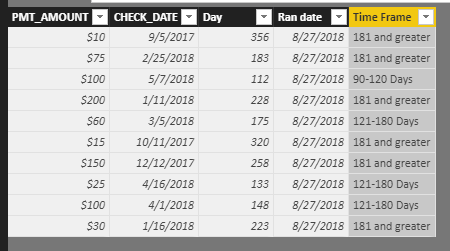
Step 3:
Drag filed Time Frame,PMT_AMOUNT,CHECK_DATE into table visual, and change the aggregate type of filed CHECK_DATE to Count.
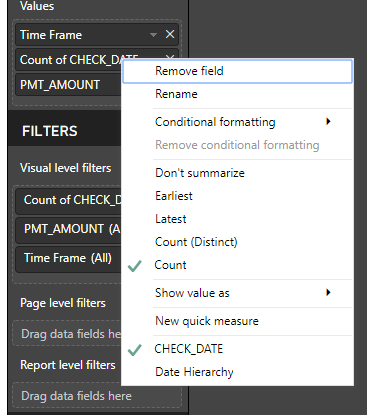
Result:
Best Regards,
Lin
Hi,
Try the below function as Calculated Column
let daysuntilltoday= (DateTime.Date(DateTime.LocalNow())-[CHECK_DATE]), d= Int64.From(daysuntilltoday), tag= if d >=90 and d <=120 then "90-120 Days" else if d >=121 and d <=180 then "121-180 Days" else if d >=181 then "181 and greater" else "Another group" in tag
Then group your data using this column
After my research , you can do these follow my steps like below:
Step1:
Add a ran date column
for example:
Step 2:
Add a Time Frame column:
Time Frame = IF(DATEDIFF(Table2[CHECK_DATE],Table2[Ran date],DAY)>=30&&DATEDIFF(Table2[CHECK_DATE],Table2[Ran date],DAY)<=120,"90-120 Days",IF(DATEDIFF(Table2[CHECK_DATE],Table2[Ran date],DAY)>120&&DATEDIFF(Table2[CHECK_DATE],Table2[Ran date],DAY)<=180,"121-180 Days",IF(DATEDIFF(Table2[CHECK_DATE],Table2[Ran date],DAY)>180,"181 and greater")))
Step 3:
Drag filed Time Frame,PMT_AMOUNT,CHECK_DATE into table visual, and change the aggregate type of filed CHECK_DATE to Count.
Result:
Best Regards,
Lin
Check out the May 2026 Power BI update to learn about new features.
Sign up to receive a private message when registration opens and key events begin.
If you have recently started exploring Fabric, we'd love to hear how it's going. Your feedback can help with product improvements.
| User | Count |
|---|---|
| 29 | |
| 27 | |
| 25 | |
| 20 | |
| 14 |
| User | Count |
|---|---|
| 53 | |
| 47 | |
| 23 | |
| 20 | |
| 19 |