This time we’re going bigger than ever. Fabric, Power BI, SQL, AI and more. We're covering it all. You won't want to miss it.
Learn moreLevel up your Power BI skills this month - build one visual each week and tell better stories with data! Get started
I would like to group data into buckets based off the number of days from which the data is ran. Here is a sample of what my data looks like.
| PMT_AMOUNT | CHECK_DATE |
| $10.00 | 9/5/2017 |
| $75.00 | 2/25/2018 |
| $100.00 | 5/7/2018 |
| $200.00 | 1/11/2018 |
| $60.00 | 3/5/2018 |
| $15.00 | 10/11/2017 |
| $150.00 | 12/12/2017 |
| $25.00 | 4/16/2018 |
| $100.00 | 4/1/2018 |
| $30.00 | 1/16/2018 |
What I would like to do is show the data as the following if I ran the data on 8/27/2018.
| Time Frame | Count | Total |
| 90-120 Days | 1 | $100.00 |
| 121-180 Days | 2 | $125.00 |
| 181 and greater | 7 | $540.00 |
Solved! Go to Solution.
After my research , you can do these follow my steps like below:
Step1:
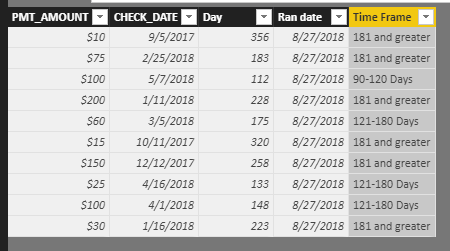
Add a ran date column
for example:
Step 2:
Add a Time Frame column:
Time Frame = IF(DATEDIFF(Table2[CHECK_DATE],Table2[Ran date],DAY)>=30&&DATEDIFF(Table2[CHECK_DATE],Table2[Ran date],DAY)<=120,"90-120 Days",IF(DATEDIFF(Table2[CHECK_DATE],Table2[Ran date],DAY)>120&&DATEDIFF(Table2[CHECK_DATE],Table2[Ran date],DAY)<=180,"121-180 Days",IF(DATEDIFF(Table2[CHECK_DATE],Table2[Ran date],DAY)>180,"181 and greater")))
Step 3:
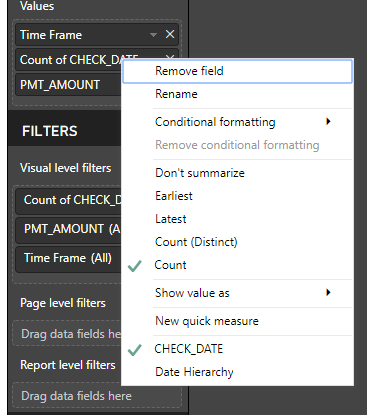
Drag filed Time Frame,PMT_AMOUNT,CHECK_DATE into table visual, and change the aggregate type of filed CHECK_DATE to Count.
Result:
Best Regards,
Lin
Hi,
Try the below function as Calculated Column
let daysuntilltoday= (DateTime.Date(DateTime.LocalNow())-[CHECK_DATE]), d= Int64.From(daysuntilltoday), tag= if d >=90 and d <=120 then "90-120 Days" else if d >=121 and d <=180 then "121-180 Days" else if d >=181 then "181 and greater" else "Another group" in tag
Then group your data using this column
After my research , you can do these follow my steps like below:
Step1:
Add a ran date column
for example:
Step 2:
Add a Time Frame column:
Time Frame = IF(DATEDIFF(Table2[CHECK_DATE],Table2[Ran date],DAY)>=30&&DATEDIFF(Table2[CHECK_DATE],Table2[Ran date],DAY)<=120,"90-120 Days",IF(DATEDIFF(Table2[CHECK_DATE],Table2[Ran date],DAY)>120&&DATEDIFF(Table2[CHECK_DATE],Table2[Ran date],DAY)<=180,"121-180 Days",IF(DATEDIFF(Table2[CHECK_DATE],Table2[Ran date],DAY)>180,"181 and greater")))
Step 3:
Drag filed Time Frame,PMT_AMOUNT,CHECK_DATE into table visual, and change the aggregate type of filed CHECK_DATE to Count.
Result:
Best Regards,
Lin
Check out the April 2026 Power BI update to learn about new features.
Sign up to receive a private message when registration opens and key events begin.
If you have recently started exploring Fabric, we'd love to hear how it's going. Your feedback can help with product improvements.
| User | Count |
|---|---|
| 37 | |
| 28 | |
| 28 | |
| 19 | |
| 17 |
| User | Count |
|---|---|
| 68 | |
| 37 | |
| 32 | |
| 28 | |
| 24 |