We've captured the moments from FabCon & SQLCon that everyone is talking about, and we are bringing them to the community, live and on-demand. Starts on April 14th. Register now
Hi,
I'm Jerry and new to PowerBI. I'm having some trouble lately to visualize some simple graphs.
I need some simple KPI's or graphs to visualize how many invoices are above the value 50.000. Is this done with a smart measure?
How many invoices are above a certain amount and this in % of total invoices?
How many invoices of the have a po number in the summarry column and this in relation of the total invoices
Example table see below
| Number | Date | Summary | Value |
| 1 | 25/02/2021 | 2021-01 | € 5.000,00 |
| 2 | 22/01/2021 | 2021-05 | € 10.000,00 |
| 3 | 29/01/2021 | PO12345 | € 600.000,00 |
| 4 | 06/09/2021 | PO54321 | € 12.000,00 |
| 5 | 06/09/2021 | PO11111 | € 12,00 |
| 6 | 09/04/2021 | INV | € 15,00 |
| 7 | 11/12/2020 | 1505 | € 15.000,00 |
| 8 | 26/10/2021 | 2021-01 | € 100.000,00 |
| 9 | 13/08/2021 | 2021-05 | € 7.500,00 |
| 10 | 30/06/2021 | PO12312 | € 500.000,00 |
Solved! Go to Solution.
Hi @jeroend ,
Here are the steps you can follow:
Graphs to visualize how many invoices are above the value 50.000”:
1. Create measure.
Flag =
IF(
MAX('Table'[Value]) >500000,1,0)
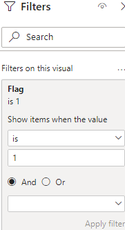
2. Place [Flag] in Filters, set is=1, apply filter.
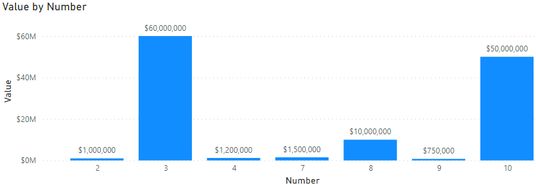
3. Result:
Only values greater than 500,000 are displayed
How many invoices are above a certain amount and this in % of total invoices:
1. Create measure.
% of total invoices =
var _over_allcount=COUNTX(FILTER(ALL('Table'),
'Table'[Value]> 500000),[Number])
var _totalinvoices=COUNTX('Table','Table'[Number])
return
DIVIDE(_over_allcount,_totalinvoices)
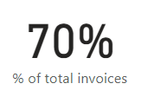
2. Result:
How many invoices of the have a po number in the summarry column and this in relation of the total invoices:
1. Create measure.
IF_ponumber =
var _mid=MID(MAX('Table'[Summary]),5,1)
return
IF(
_mid <> "-",1,0)summarry% =
var _countponumber=COUNTX(FILTER(ALL('Table'),[IF_ponumber]=1),[Number])
var _countall=COUNTX('Table','Table'[Number])
return
DIVIDE(_countponumber,_countall)
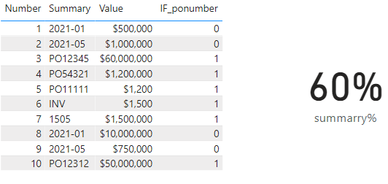
2. Result.
Best Regards,
Liu Yang
If this post helps, then please consider Accept it as the solution to help the other members find it more quickly
Hi @jeroend ,
Here are the steps you can follow:
Graphs to visualize how many invoices are above the value 50.000”:
1. Create measure.
Flag =
IF(
MAX('Table'[Value]) >500000,1,0)
2. Place [Flag] in Filters, set is=1, apply filter.
3. Result:
Only values greater than 500,000 are displayed
How many invoices are above a certain amount and this in % of total invoices:
1. Create measure.
% of total invoices =
var _over_allcount=COUNTX(FILTER(ALL('Table'),
'Table'[Value]> 500000),[Number])
var _totalinvoices=COUNTX('Table','Table'[Number])
return
DIVIDE(_over_allcount,_totalinvoices)
2. Result:
How many invoices of the have a po number in the summarry column and this in relation of the total invoices:
1. Create measure.
IF_ponumber =
var _mid=MID(MAX('Table'[Summary]),5,1)
return
IF(
_mid <> "-",1,0)summarry% =
var _countponumber=COUNTX(FILTER(ALL('Table'),[IF_ponumber]=1),[Number])
var _countall=COUNTX('Table','Table'[Number])
return
DIVIDE(_countponumber,_countall)
2. Result.
Best Regards,
Liu Yang
If this post helps, then please consider Accept it as the solution to help the other members find it more quickly
Measure = CALCULATE(COUNTROWS('Table'),FILTER('Table','Table'[Value]>5000))
Measure 2 = [Measure]/COUNTROWS('Table')
pls see the attachment to check if this is what you want
Proud to be a Super User!
If you have recently started exploring Fabric, we'd love to hear how it's going. Your feedback can help with product improvements.
A new Power BI DataViz World Championship is coming this June! Don't miss out on submitting your entry.
Share feedback directly with Fabric product managers, participate in targeted research studies and influence the Fabric roadmap.
| User | Count |
|---|---|
| 54 | |
| 39 | |
| 32 | |
| 17 | |
| 15 |
| User | Count |
|---|---|
| 64 | |
| 63 | |
| 37 | |
| 36 | |
| 22 |