This is best Fabric, Power BI, SQL and AI community event. How do we know? The last event sold out! Save €200 with code FABCMTY200.
Register nowA new Data Days event is coming soon! This time we’re going bigger than ever. Fabric, Power BI, SQL, AI and more. Don't miss out.
Dear all
I am trying to group some rows of my data based on the first two columns, Index and Account.Name, where the value on another columns is null. The result I want is to avoid null values on the last 2 columns, is it possible to be done in power query?
Solved! Go to Solution.
You can do this using Group By in the Power Query interface.
You just have to choose an arbitrary aggregation for the Customer Care Manager & Customer Support Coordinator columns (in case there are multiple values for a given Index/Account.Name combination, which I imagine shouldn't happen).
In my example I used Min, which automatically ignores nulls using the List.Min function.
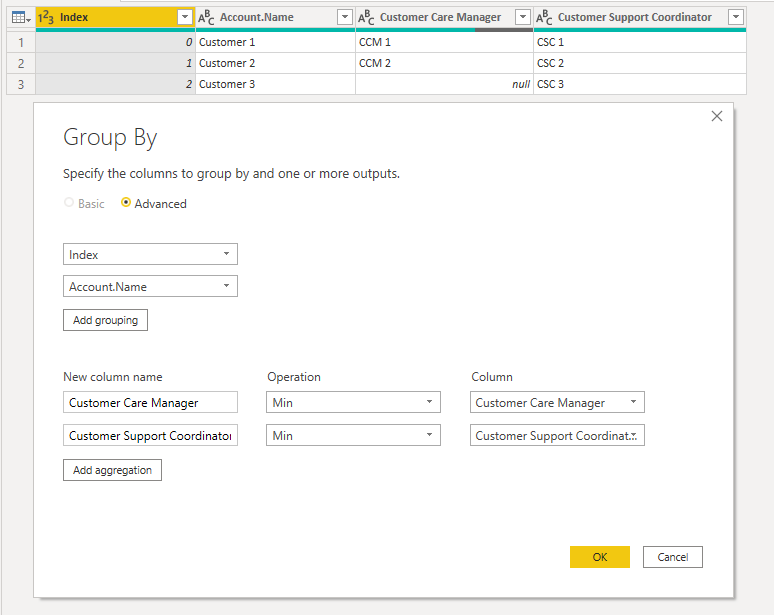
Here is my M code, including creating the table. The relevant step is #"Grouped Rows".
let
Source = Table.FromRows(Json.Document(Binary.Decompress(Binary.FromText("i45WMlDSUXIuLS7Jz00tUjAEcZx9wbRSrA4WWRA/2BnIBMkaIssaQfUawfRiyEL1GoFljZBljRGyxkqxsQA=", BinaryEncoding.Base64), Compression.Deflate)), let _t = ((type nullable text) meta [Serialized.Text = true]) in type table [Index = _t, Account.Name = _t, #"Customer Care Manager" = _t, #"Customer Support Coordinator" = _t]),
#"Changed Type" = Table.TransformColumnTypes(Source,{{"Index", Int64.Type}, {"Account.Name", type text}, {"Customer Care Manager", type text}, {"Customer Support Coordinator", type text}}),
OriginalTable = Table.ReplaceValue(#"Changed Type","",null,Replacer.ReplaceValue,{"Customer Care Manager", "Customer Support Coordinator"}),
#"Grouped Rows" = Table.Group(OriginalTable, {"Index", "Account.Name"}, {{"Customer Care Manager", each List.Min([Customer Care Manager]), type nullable text}, {"Customer Support Coordinator", each List.Min([Customer Support Coordinator]), type nullable text}})
in
#"Grouped Rows"
Regards,
Owen
You can do this using Group By in the Power Query interface.
You just have to choose an arbitrary aggregation for the Customer Care Manager & Customer Support Coordinator columns (in case there are multiple values for a given Index/Account.Name combination, which I imagine shouldn't happen).
In my example I used Min, which automatically ignores nulls using the List.Min function.
Here is my M code, including creating the table. The relevant step is #"Grouped Rows".
let
Source = Table.FromRows(Json.Document(Binary.Decompress(Binary.FromText("i45WMlDSUXIuLS7Jz00tUjAEcZx9wbRSrA4WWRA/2BnIBMkaIssaQfUawfRiyEL1GoFljZBljRGyxkqxsQA=", BinaryEncoding.Base64), Compression.Deflate)), let _t = ((type nullable text) meta [Serialized.Text = true]) in type table [Index = _t, Account.Name = _t, #"Customer Care Manager" = _t, #"Customer Support Coordinator" = _t]),
#"Changed Type" = Table.TransformColumnTypes(Source,{{"Index", Int64.Type}, {"Account.Name", type text}, {"Customer Care Manager", type text}, {"Customer Support Coordinator", type text}}),
OriginalTable = Table.ReplaceValue(#"Changed Type","",null,Replacer.ReplaceValue,{"Customer Care Manager", "Customer Support Coordinator"}),
#"Grouped Rows" = Table.Group(OriginalTable, {"Index", "Account.Name"}, {{"Customer Care Manager", each List.Min([Customer Care Manager]), type nullable text}, {"Customer Support Coordinator", each List.Min([Customer Support Coordinator]), type nullable text}})
in
#"Grouped Rows"
Regards,
Owen
Check out the May 2026 Power BI update to learn about new features.
Sign up to receive a private message when registration opens and key events begin.
If you have recently started exploring Fabric, we'd love to hear how it's going. Your feedback can help with product improvements.
| User | Count |
|---|---|
| 29 | |
| 25 | |
| 25 | |
| 21 | |
| 14 |
| User | Count |
|---|---|
| 61 | |
| 50 | |
| 25 | |
| 20 | |
| 20 |
