Join us at FabCon Atlanta from March 16 - 20, 2026, for the ultimate Fabric, Power BI, AI and SQL community-led event. Save $200 with code FABCOMM.
Register now!The Power BI Data Visualization World Championships is back! Get ahead of the game and start preparing now! Learn more
Hi all,
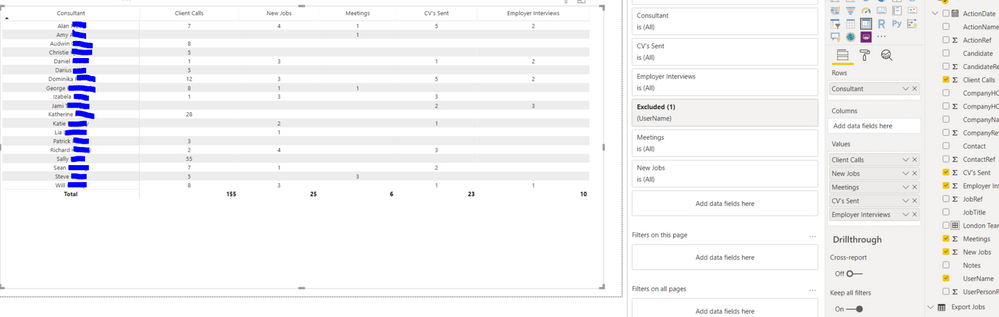
I have created a Matrix and was wondering if it is possible to organise the 'Consultant' Column into labelled subgroups.
For example the top five consultants into a 'London Team' subgroup and a subtotal below this.
Thanks,
Henry
Hi @HenryJS ,
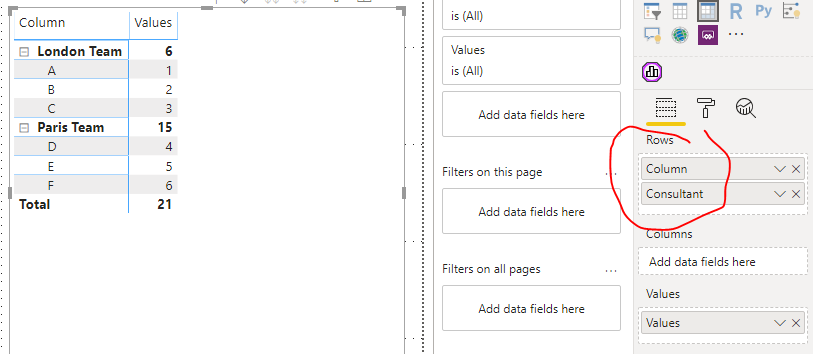
Do you have a "team" column/table which is related to "[Consultant]" column?
If not, you can realize that, but it's not dynamic.
If you want to create the column with DAX, it maybe be complex when you have a large amount of data.
Column =
SWITCH(
[Consultant],
"A", "London Team",
"B", "London Team",
"C", "London Team",
"D", "Paris Team",
"E", "Paris Team",
"F", "Paris Team"
)
Best regards,
Lionel Chen
If this post helps, then please consider Accept it as the solution to help the other members find it more quickly.
The Power BI Data Visualization World Championships is back! Get ahead of the game and start preparing now!
| User | Count |
|---|---|
| 40 | |
| 37 | |
| 33 | |
| 29 | |
| 27 |
| User | Count |
|---|---|
| 133 | |
| 104 | |
| 61 | |
| 59 | |
| 55 |