cancel
Showing results for 
Search instead for 
Did you mean: 

The Power BI Data Visualization World Championships is back! Get ahead of the game and start preparing now! Learn more

Reply
Anonymous
Not applicable

Group By Date Hour and Production line

Hi All,


Appreciate if you guys can help. 


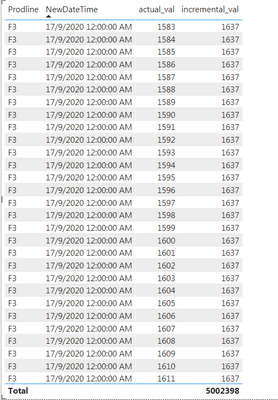
I have created a column 'NewDateTime' from my datetime column to show the date and hour group.


jenas6423_0-1600675480014.png


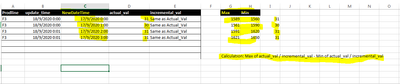
I would like to group by Prodline, Date & Hour. With Actual and Incremental value is from the max value - min value within the hour.


The expected result is like:


jenas6423_1-1600675870402.png


You may find the data source file at below link:

https://drive.google.com/file/d/10e__qMyssLSVOEnSfhdRBRG4EG5cIrZ2/view?usp=sharing


I couldnt use power query as Im using direct query, so have to create new column with dax.


Regards.


Jenas


1 ACCEPTED SOLUTION
v-xuding-msft
Community Support
Community Support

Hi @Anonymous ,


You could try to use ALLEXCEPT to group data. But for your expected results, I'm a little confused. Do you want to create a "Calculation" column that is grouped by Prodline, Date & Hour? If so, there is no data about Max and Min values in your data source.


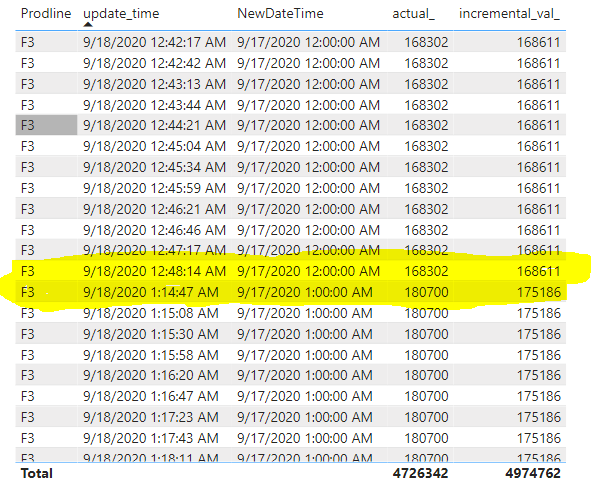
I created two measures to calculate actual and incremental values by group. Create calculated columns with Direct Query may change your connection mode from DQ to mix (DQ+Import). So it is best to create measures to implement it.

actual_ = CALCULATE(SUM(data[actual_val]),ALLEXCEPT(data,data[Prodline],data[NewDateTime]))
incremental_val_ = CALCULATE(SUM(data[incremental_val]),ALLEXCEPT(data,data[Prodline],data[NewDateTime]))

 3.PNG


Best Regards,
Xue Ding
If this post helps, then please consider Accept it as the solution to help the other members find it more quickly.

View solution in original post

3 REPLIES 3
Syndicate_Admin
Administrator
Administrator

I have two call tables, one contains unique records (table 1) and the other records in sequence (Table 2), I need to find a way to group the call sequence of table 2 with the records of table 1; The critical thing is that the only key I can in both tables is the date and time.

Can someone advise me?

v-xuding-msft
Community Support
Community Support

Hi @Anonymous ,


You could try to use ALLEXCEPT to group data. But for your expected results, I'm a little confused. Do you want to create a "Calculation" column that is grouped by Prodline, Date & Hour? If so, there is no data about Max and Min values in your data source.


I created two measures to calculate actual and incremental values by group. Create calculated columns with Direct Query may change your connection mode from DQ to mix (DQ+Import). So it is best to create measures to implement it.

actual_ = CALCULATE(SUM(data[actual_val]),ALLEXCEPT(data,data[Prodline],data[NewDateTime]))
incremental_val_ = CALCULATE(SUM(data[incremental_val]),ALLEXCEPT(data,data[Prodline],data[NewDateTime]))

 3.PNG


Best Regards,
Xue Ding
If this post helps, then please consider Accept it as the solution to help the other members find it more quickly.
Anonymous
Not applicable

Hi Xue Ding,


Thank you for your reply. I have already solved the issue. Appreciate.


Regards.


Jenas

Helpful resources

Announcements
Power BI DataViz World Championships

Power BI Dataviz World Championships

The Power BI Data Visualization World Championships is back! Get ahead of the game and start preparing now!

December 2025 Power BI Update Carousel

Power BI Monthly Update - December 2025

Check out the December 2025 Power BI Holiday Recap!

FabCon Atlanta 2026 carousel

FabCon Atlanta 2026

Join us at FabCon Atlanta, March 16-20, for the ultimate Fabric, Power BI, AI and SQL community-led event. Save $200 with code FABCOMM.