This is best Fabric, Power BI, SQL and AI community event. How do we know? The last event sold out! Save €200 with code FABCMTY200.
Register nowThe Fabric community is upgrading! Read all of the details including the timeline and what you can expect. Learn more
I was curious if it's possible to add shaded error bands to a line chart in Power BI. An example of what I'm talking about would be here:
http://nmarinsek.com/tutorial-how-to-make-shaded-error-bands-in-excel/
Another chart I would like to be able to create is something like this:
A third chart that I'm curious about is this:
I see the functionality to insert radials, line charts, and regular charts, but all of the built in ones seem basic compared to the required needs.
Thanks!
Solved! Go to Solution.
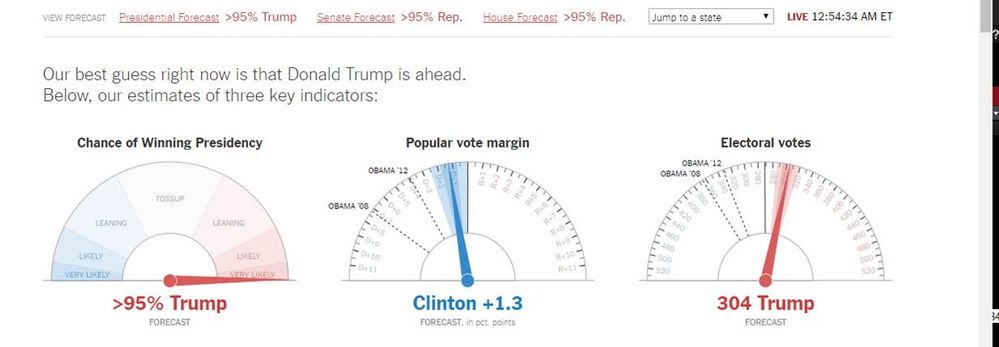
Yep I think these dial gauges became very popular on Tuesday night - unfortunately we have nothing even close to this ![]()
It would be really nice to have that many customization options in the dial gauge!
You can create an Idea here
https://ideas.powerbi.com/forums/265200-power-bi
Or here
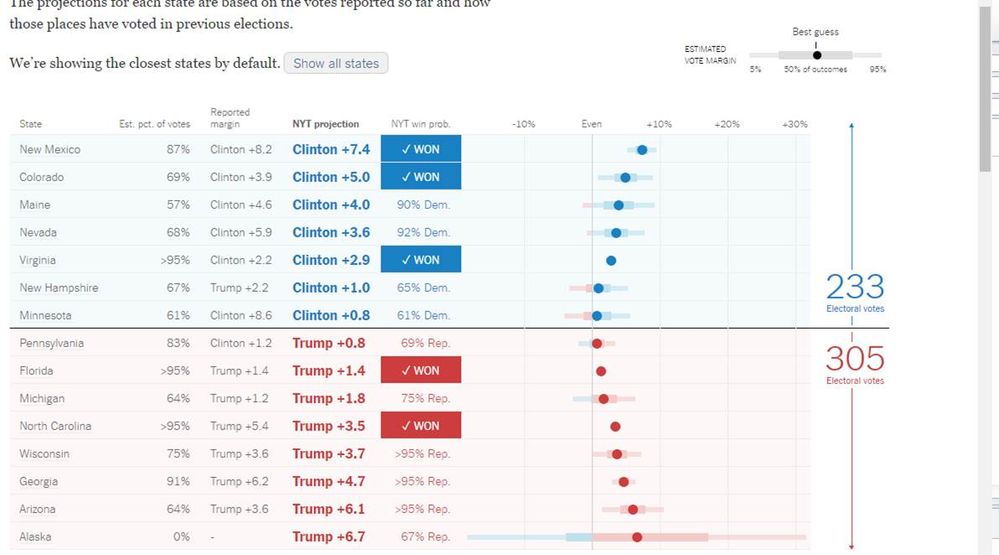
I actually already had created an Idea back in March 2016 (Primary Season) based on their (NYT) election coverage maps
You can see the current maps here
http://www.nytimes.com/elections/results/president
And the forecast gauges
http://www.nytimes.com/elections/forecast/president
Yep I think these dial gauges became very popular on Tuesday night - unfortunately we have nothing even close to this ![]()
It would be really nice to have that many customization options in the dial gauge!
You can create an Idea here
https://ideas.powerbi.com/forums/265200-power-bi
Or here
I actually already had created an Idea back in March 2016 (Primary Season) based on their (NYT) election coverage maps
You can see the current maps here
http://www.nytimes.com/elections/results/president
And the forecast gauges
http://www.nytimes.com/elections/forecast/president
Join us in Barcelona for FabCon and SQLCon, the Fabric, Power BI, SQL, and AI community event. Save €200 with code FABCMTY200.
| User | Count |
|---|---|
| 24 | |
| 22 | |
| 20 | |
| 18 | |
| 14 |
| User | Count |
|---|---|
| 27 | |
| 22 | |
| 21 | |
| 20 | |
| 20 |