cancel
Showing results for 
Search instead for 
Did you mean: 

The Power BI Data Visualization World Championships is back! Get ahead of the game and start preparing now! Learn more

Reply
Anonymous
Not applicable

Graph by specific month order

Hi guys, 


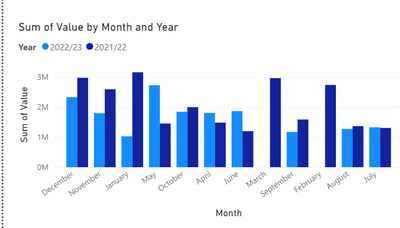
I have watched a lot of videos and tried to follow online guidance on here but I still can't seem to get my graphs to order in financial year order (April first). I understand I need to have a new column with month numbers but struggling with the coding for this too...Any help is much appreciated. See below for my current data and graph. 


Calb123_0-1677247940350.png

Calb123_1-1677247962394.png


1 ACCEPTED SOLUTION
Anonymous
Not applicable

Easy as: 

1. Enter Data - copy and paste this table

MonthFinancial Order
January10
February11
March12
April1
May2
June3
July4
August5
September6
October7
Novermber8
December9


1.5 - In the Data view, click on your new Month column, Sort Column By - "Financial Order

2. In your Model View - link the two Months columns - bidirectional one to many relationship. 

3. In your chart, drag the Months from your new table as the x axis. 

View solution in original post

4 REPLIES 4
Anonymous
Not applicable

Easy as: 

1. Enter Data - copy and paste this table

MonthFinancial Order
January10
February11
March12
April1
May2
June3
July4
August5
September6
October7
Novermber8
December9


1.5 - In the Data view, click on your new Month column, Sort Column By - "Financial Order

2. In your Model View - link the two Months columns - bidirectional one to many relationship. 

3. In your chart, drag the Months from your new table as the x axis. 

Anonymous
Not applicable

Hi Len, 


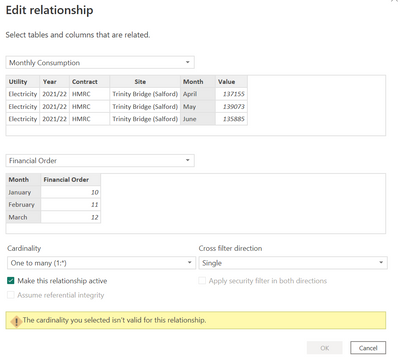
Thanks for your help.  For some reason it is dispalying as not valid. Any ideas?

Calb123_0-1677490592882.png


Anonymous
Not applicable

@Anonymous  Got it, I accidentally had them linked to other columns in model view. 


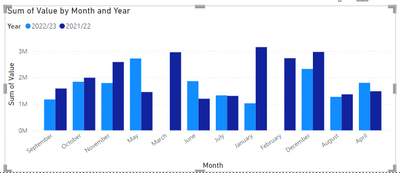
Now I believe I have everything as you have said...but still no luck with graph. Any ideas? 

Calb123_1-1677491375200.pngCalb123_2-1677491390122.png


Anonymous
Not applicable

Got it as I want it now👍 Thanks for yur help @Anonymous 

Helpful resources

Announcements
Power BI DataViz World Championships

Power BI Dataviz World Championships

The Power BI Data Visualization World Championships is back! Get ahead of the game and start preparing now!

December 2025 Power BI Update Carousel

Power BI Monthly Update - December 2025

Check out the December 2025 Power BI Holiday Recap!

FabCon Atlanta 2026 carousel

FabCon Atlanta 2026

Join us at FabCon Atlanta, March 16-20, for the ultimate Fabric, Power BI, AI and SQL community-led event. Save $200 with code FABCOMM.