This time we’re going bigger than ever. Fabric, Power BI, SQL, AI and more. We're covering it all. You won't want to miss it.
Learn moreLevel up your Power BI skills this month - build one visual each week and tell better stories with data! Get started
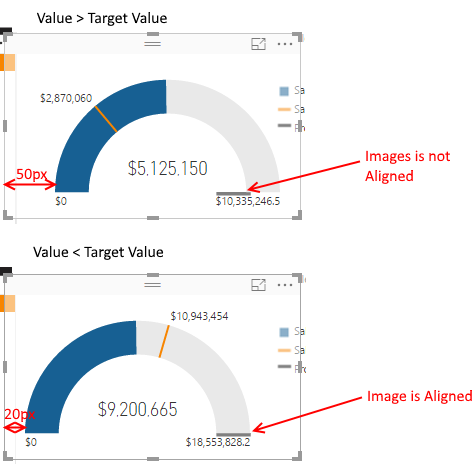
I've noticed the alignment of a guage chart changes depending on the data.
When the Value is smaller than the Target Value, the guage starts 20px from the leftmost point of the widget.
When the Value is greater than the Target Value, the guage starts 50px from the leftmost point of the widget.
Here's a picture:
Is this intended behaviour, or a bug? It is making it impossible to align images with a guage chart (you can see in my screenshot the total mark is aligned in the second example, but not the first).
Solved! Go to Solution.
Hi @andrewmosey,
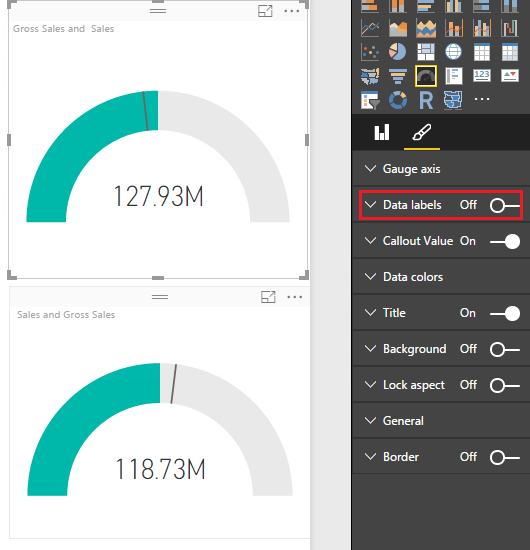
Based on my test, the issue is caused by the data labels in the Gauge chart visual. If we want to display data label on the left or right side, it will take some place and the gauge will move to right or left correspondingly. If you want to align two gauge visual properly, you can turn off data label for each gauge visual.
If you have any question, please feel free to ask.
Best Regards,
Qiuyun Yu
Hi @andrewmosey,
Based on my test, the issue is caused by the data labels in the Gauge chart visual. If we want to display data label on the left or right side, it will take some place and the gauge will move to right or left correspondingly. If you want to align two gauge visual properly, you can turn off data label for each gauge visual.
If you have any question, please feel free to ask.
Best Regards,
Qiuyun Yu
Another excellent reason not to use gauge charts.
The reason for the alignment seems to be the data label for the "current" value. The label extends beyond the arch of the gauge, so the plot area is adjusted.
Instead of a gauge, consider a bullet chart, a much better visualisation, which will not have that problem. You can get them from the Visuals Gallery.
cheers, teylyn
Check out the April 2026 Power BI update to learn about new features.
Sign up to receive a private message when registration opens and key events begin.
If you have recently started exploring Fabric, we'd love to hear how it's going. Your feedback can help with product improvements.
| User | Count |
|---|---|
| 35 | |
| 32 | |
| 25 | |
| 22 | |
| 18 |
| User | Count |
|---|---|
| 66 | |
| 36 | |
| 32 | |
| 25 | |
| 23 |