cancel
Showing results for 
Search instead for 
Did you mean: 

The Power BI Data Visualization World Championships is back! Get ahead of the game and start preparing now! Learn more

Reply
Anonymous
Not applicable

Graph Axis Separate by Month

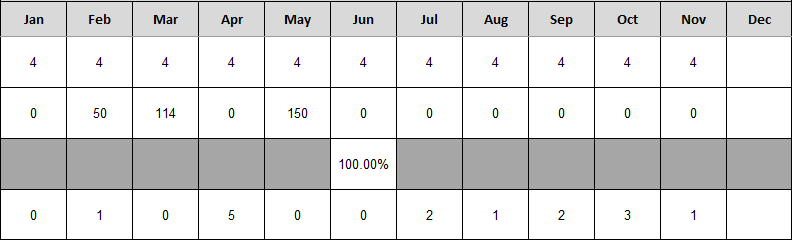
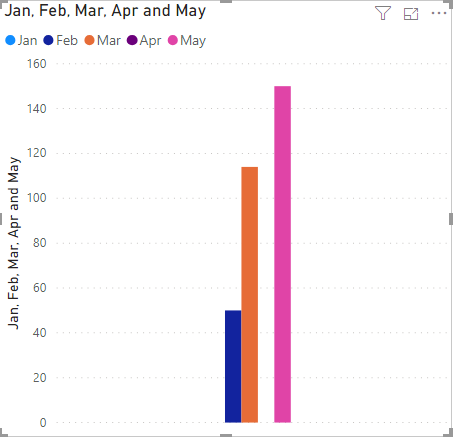
I am attempting to make a graph of information broken down by month. The rows of the table I am using are different monthly tasks, and the columns are the count of the tasks performed by month. This graph is on a second page for drilling down to highlight a specific task. The idea is to drilldown to a task, then have a graph of the count of tasks per month in a Clustered Column Chart. I would like to have a separate "cluster" for each month, so that each is labeled accordingly. But I do not have a "month" column that I can place in the axis field. Does anyone know how I can go about doing this? The only way I know how to get it close is to add all the month columns individually to the values field, which creates one megacluster.


Below are screenshots of the data table and the graph I produced with a few of the months included. 
 

tablepic.PNG


Ideally, there would be five separate clusters here, but the months are on the y-axis, not the x-axis.
 

graphpic.PNG

1 ACCEPTED SOLUTION
Anonymous
Not applicable

Turns out I can unpivot other columns in the Query Editor to get this to work. 

View solution in original post

5 REPLIES 5
Tahreem24
Super User
Super User

Do you have a date column in your data set? If yes, so you can use month hierarchy only in your clustered column chart.

Don't forget to give thumbs up 👍and accept this as a solution if this helps you.
Don't forget to give thumbs up and accept this as a solution if it helped you!!!

Please take a quick glance at newly created dashboards : Restaurant Management Dashboard , HR Analytics Report , Hotel Management Report, Sales Analysis Report , Fortune 500 Companies Analysis , Revenue Tracking Dashboard
Anonymous
Not applicable

Unfortunately I do not have a date column in this data set. Just the month columns which have the count of how many times each row & task has been performed in that month.

You can go to model view then choose sort by column and then select Month Name. Refer below link to get more deets on your requirement.

https://www.c-sharpcorner.com/article/sort-by-month-name-in-power-bi/

Don't forget to give thumbs up 👍 and accept this as a solution if this helps you.

Don't forget to give thumbs up and accept this as a solution if it helped you!!!

Please take a quick glance at newly created dashboards : Restaurant Management Dashboard , HR Analytics Report , Hotel Management Report, Sales Analysis Report , Fortune 500 Companies Analysis , Revenue Tracking Dashboard
Anonymous
Not applicable

This is good to note for when I have a column of month names. However I instead have a column for every month instead. See the screenshot in my original post for what the data looks like.

Anonymous
Not applicable

Turns out I can unpivot other columns in the Query Editor to get this to work. 

Helpful resources

Announcements
Power BI DataViz World Championships

Power BI Dataviz World Championships

The Power BI Data Visualization World Championships is back! Get ahead of the game and start preparing now!

December 2025 Power BI Update Carousel

Power BI Monthly Update - December 2025

Check out the December 2025 Power BI Holiday Recap!

FabCon Atlanta 2026 carousel

FabCon Atlanta 2026

Join us at FabCon Atlanta, March 16-20, for the ultimate Fabric, Power BI, AI and SQL community-led event. Save $200 with code FABCOMM.