Join us at FabCon Atlanta from March 16 - 20, 2026, for the ultimate Fabric, Power BI, AI and SQL community-led event. Save $200 with code FABCOMM.
Register now!The Power BI Data Visualization World Championships is back! Get ahead of the game and start preparing now! Learn more
Hello everyone,
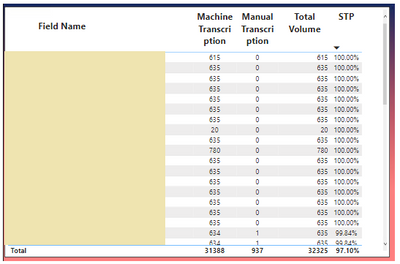
I have a Table visualization below.
I need a help to create the Rank in order for the STP % even if the STP is same [for eg; the very first few records showing 100% and would like to have Rank as 1 and 2 and go on].
Thanks in advance.
Solved! Go to Solution.
Hi,
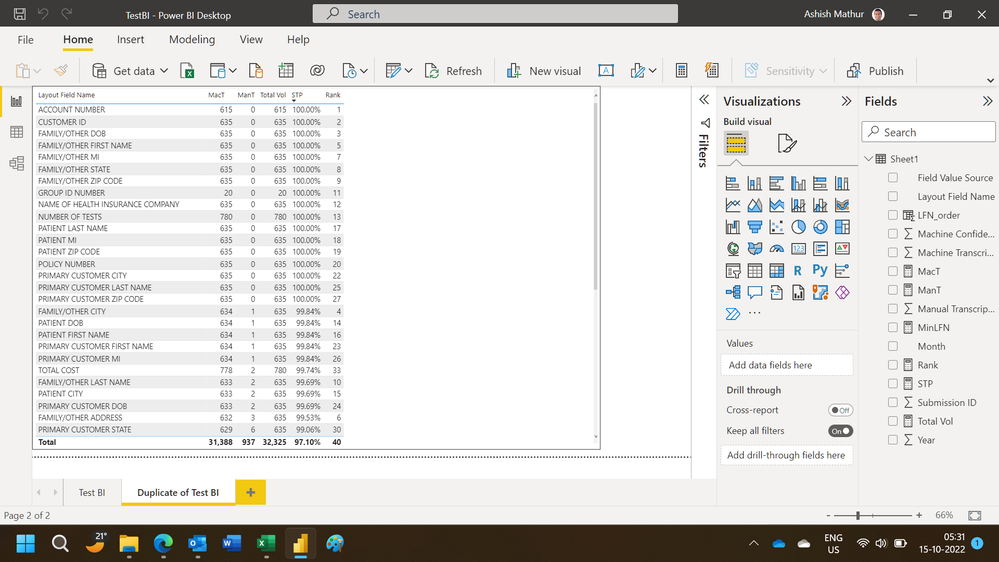
While i have been able to get different rank values, the numbers/order is not correct. This may serve as a starting point for you. You may download my PBI file from here.
Hope this helps.
Hi,
I can try to help. Share the download link of your PBI file.
Hi,
While i have been able to get different rank values, the numbers/order is not correct. This may serve as a starting point for you. You may download my PBI file from here.
Hope this helps.
Hi @Anonymous,
Perhaps you can add a category field to the expression to ranking based on multiple columns, they should help reduce the duplicate rankings: (these rankings will be based on the category and values)
RANKX on multiple columns with DAX and Power BI - SQLBI
You can also refer to the following link about rankx function if helps:
Introducing RANKX in DAX - SQLBI
Regards,
Xiaoxin Sheng
The Power BI Data Visualization World Championships is back! Get ahead of the game and start preparing now!
| User | Count |
|---|---|
| 41 | |
| 38 | |
| 36 | |
| 30 | |
| 28 |
| User | Count |
|---|---|
| 129 | |
| 88 | |
| 79 | |
| 68 | |
| 63 |