Don't miss your chance to take the Fabric Data Engineer (DP-600) exam for FREE! Find out how by watching the DP-600 session on-demand now through April 28th.
Learn moreJoin the FabCon + SQLCon recap series. Up next: Power BI, Real-Time Intelligence, IQ and AI, and Data Factory take center stage. All sessions are available on-demand after the live show. Register now
Hello everyone,
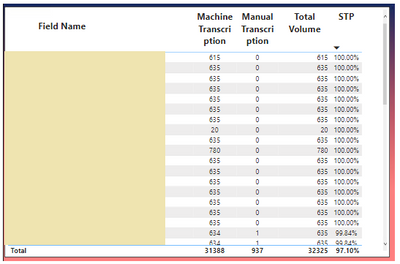
I have a Table visualization below.
I need a help to create the Rank in order for the STP % even if the STP is same [for eg; the very first few records showing 100% and would like to have Rank as 1 and 2 and go on].
Thanks in advance.
Solved! Go to Solution.
Hi,
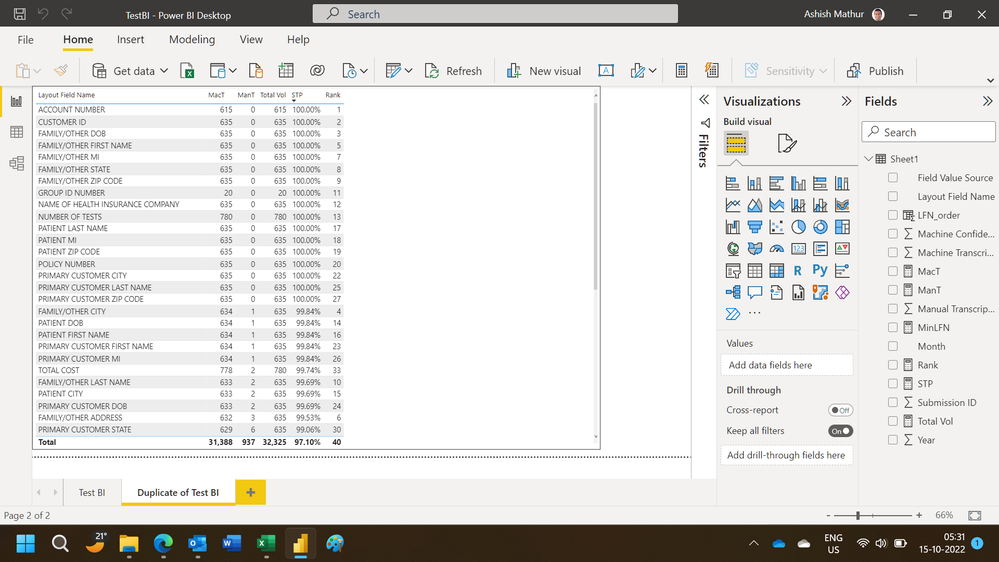
While i have been able to get different rank values, the numbers/order is not correct. This may serve as a starting point for you. You may download my PBI file from here.
Hope this helps.
Hi,
I can try to help. Share the download link of your PBI file.
Hi,
While i have been able to get different rank values, the numbers/order is not correct. This may serve as a starting point for you. You may download my PBI file from here.
Hope this helps.
Hi @Anonymous,
Perhaps you can add a category field to the expression to ranking based on multiple columns, they should help reduce the duplicate rankings: (these rankings will be based on the category and values)
RANKX on multiple columns with DAX and Power BI - SQLBI
You can also refer to the following link about rankx function if helps:
Introducing RANKX in DAX - SQLBI
Regards,
Xiaoxin Sheng
Check out the April 2026 Power BI update to learn about new features.
If you have recently started exploring Fabric, we'd love to hear how it's going. Your feedback can help with product improvements.
A new Power BI DataViz World Championship is coming this June! Don't miss out on submitting your entry.
| User | Count |
|---|---|
| 41 | |
| 37 | |
| 34 | |
| 21 | |
| 16 |
| User | Count |
|---|---|
| 65 | |
| 59 | |
| 31 | |
| 25 | |
| 25 |