

Get certified for free when you join Fabric Data Days 2026 and dive into Fabric, Power BI, SQL, AI, and other essential data skills.
Join nowData Days is here! Join us now for 60+ days of learning, challenges, and connection. Learn more
Hi Everyone,
I setup my dataflow fine on PBI Server, and I see the data and I'm able to edit it. I'm able to find the dataflow in PBI Desktop and navigate, but when it loads the table is empty.
@Anonymous
Hi,
please try to click refresh as you can see in the red circle.
I tried refreshing, but still see "This table is empty"
@Anonymous
Hi
when you are editig your data in Dataflow you will see the following
Right?
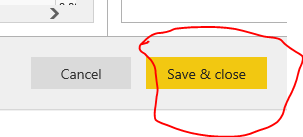
Then you click on Save and Close
Then appear a message; "We are validating your query ......."
Then you have to close the editing session clicking on Close (X Close)
at this point making a connection in Power Bi Desktop
- Get Data from Power BI dataflow
- Select the checkbox for the file you wanto to connect
- click on the icon Refresh at your right (inside the red line)
and it should work
Regards
Thanks for the suggestion. I just tried as you mentioned but still no data. I get all the fields that I added, just not the data within them. I have no problem pulling from datasets, it's just dataflows
@Anonymous
Hi
I tried once again on my dataflow and I am not able to understand.
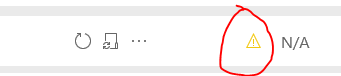
Is there a yellow traingle on dataflow?
Here is a test on my side (I know that it does not work because linking entities requires Premium non available at moment for me)
Could you check if your dataflow has an error?
Don't miss out on Data Days, June 15 through August 7. Learn Fabric, Power BI, SQL, AI and more.
Check out the May 2026 Power BI update to learn about new features.
| User | Count |
|---|---|
| 23 | |
| 23 | |
| 21 | |
| 17 | |
| 13 |
| User | Count |
|---|---|
| 58 | |
| 51 | |
| 39 | |
| 29 | |
| 24 |