Get certified for free when you join Fabric Data Days 2026 and dive into Fabric, Power BI, SQL, AI, and other essential data skills.
Join nowData Days is here! Join us now for 60+ days of learning, challenges, and connection. Learn more
Hello,
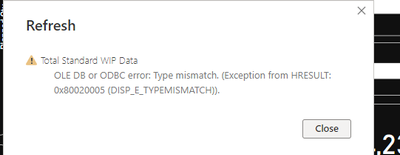
Getting this error while refreshing the dataset need help for below error
Regards,
hb0135
Solved! Go to Solution.
Hi @hb0135
The "Type mismatch" error usually occurs when there is a problem with the data types of the columns in the query.
Here are a few things you can try to troubleshoot the issue:
Check the data types of the columns in the query. Make sure that the data types are consistent with the data in the source. For example, if a column contains numeric data, make sure that the data type is set to "Whole Number" or "Decimal Number" in the Query Editor.
Check for any errors in the data. Make sure that all values in the columns are of the correct data type. For example, if a column is set to the "Date" data type, make sure that all values in the column are valid dates.
Check for any formatting issues in the data. Make sure that all values in the columns are properly formatted according to the data type. For example, if a column is set to the "Currency" data type, make sure that all values in the column are formatted as currency.
Check for any missing or blank values in the data. Make sure that all required columns have values, and that all values are properly formatted according to the data type.
If this post helps, then please consider Accepting it as the solution to help the other members find it more quickly
Hi @hb0135
The "Type mismatch" error usually occurs when there is a problem with the data types of the columns in the query.
Here are a few things you can try to troubleshoot the issue:
Check the data types of the columns in the query. Make sure that the data types are consistent with the data in the source. For example, if a column contains numeric data, make sure that the data type is set to "Whole Number" or "Decimal Number" in the Query Editor.
Check for any errors in the data. Make sure that all values in the columns are of the correct data type. For example, if a column is set to the "Date" data type, make sure that all values in the column are valid dates.
Check for any formatting issues in the data. Make sure that all values in the columns are properly formatted according to the data type. For example, if a column is set to the "Currency" data type, make sure that all values in the column are formatted as currency.
Check for any missing or blank values in the data. Make sure that all required columns have values, and that all values are properly formatted according to the data type.
If this post helps, then please consider Accepting it as the solution to help the other members find it more quickly
Hello,
Thanks for help and also the errror is gone after applying your solution.
Regards & Thanks,
hb0135
Glad to help 🙂
Don't miss out on Data Days, June 15 through August 7. Learn Fabric, Power BI, SQL, AI and more.
Check out the May 2026 Power BI update to learn about new features.
| User | Count |
|---|---|
| 23 | |
| 21 | |
| 20 | |
| 19 | |
| 13 |
| User | Count |
|---|---|
| 58 | |
| 52 | |
| 37 | |
| 31 | |
| 27 |