cancel
Showing results for 
Search instead for 
Did you mean: 

The FabCon + SQLCon recap series starts April 14th at 8am Pacific. If you’re tracking where AI is going inside Fabric, this first session is a can't miss. Register now

Reply
steambucky
Helper III
Helper III

Getting averages from SPECIFIC rows

Units of a department are getting evaluated on 4 things.  Anywhere there is a 0 means that unit is not yet evaluated. I need to create averages from units that HAVE been evaluated. 

This is the data: 

DepartmentUnitStaff Efficency Staff trainingManager Efficency Manager Training 
Natural resources, Mines and EnergyMines3224
Natural resources, Mines and EnergyEnvironmental Science0000
Natural resources, Mines and EnergyFisheries0000
Natural resources, Mines and EnergyEnergy2342
Natural resources, Mines and EnergyClimate science1215


This is the desired output is something like this: 


 Staff Efficency Staff trainingManager Efficency Manager Training 
Natural resources, Mines and Energy - Average scores22.32.33.6


Doing the averages with but including the two units that have ZEROs in the data will create averages like this: 


 Staff Efficency Staff trainingManager Efficency Manager Training 
Natural resources, Mines and Energy - Average scores1.21.41.42.2


Whats the easiest way can get the averages of the units that HAVE been assessed? 


Note: If change my base data and subsitute "NOT ASSESSED" for the 0s, Excel is happy enough to only calculate averages on the numbers in the columns and gives me the right result. Power BI doesnt like the like a mix of data types ( numbers and text ) and and I get errors.  

1 ACCEPTED SOLUTION
edhans
Community Champion
Community Champion

You can use AVERAGEX and replace the zeros with blanks in the measure without changing your underlying data. Blanks are not evaluated with the AVERAGEX function.


Manager Training Avg = 
    AVERAGEX('DataTable',
        IF(
            'DataTable'[Manager Training] > 0,
            'DataTable'[Manager Training],
            BLANK()
            )
    )


Did I answer your question? Mark my post as a solution!
Did my answers help arrive at a solution? Give it a kudos by clicking the Thumbs Up!

DAX is for Analysis. Power Query is for Data Modeling


Proud to be a Super User!

MCSA: BI Reporting

View solution in original post

3 REPLIES 3
Nathaniel_C
Community Champion
Community Champion

Hi @steambucky ,
Please try this 

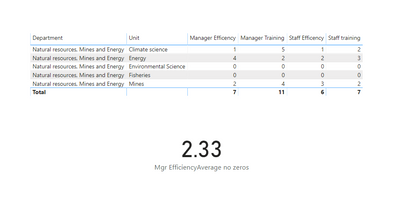
Mgr EfficiencyAverage no zeros = CALCULATE(AVERAGE(NR[Manager Efficency ]),NR[Manager Efficency ]<>0)

ave.PNG

Let me know if you have any questions.

If this solves your issues, please mark it as the solution, so that others can find it easily. Kudos are nice too.
Nathaniel


Did I answer your question? Mark my post as a solution!

Proud to be a Super User!


amitchandak
Super User
Super User

Check if this can work for you

calculate(avergae(	Staff Efficency ),	Staff Efficency <>0)

avergae(filter(table,Staff Efficency <>0)Staff Efficency )


Appreciate your Kudos. In case, this is the solution you are looking for, mark it as the Solution. In case it does not help, please provide additional information and mark me with @
Thanks.

My Recent Blog - https://community.powerbi.com/t5/Community-Blog/Comparing-Data-Across-Date-Ranges/ba-p/823601

Share with Power BI Enthusiasts: Full Power BI Video (20 Hours) YouTube
Microsoft Fabric Series 60+ Videos YouTube
Microsoft Fabric Hindi End to End YouTube
edhans
Community Champion
Community Champion

You can use AVERAGEX and replace the zeros with blanks in the measure without changing your underlying data. Blanks are not evaluated with the AVERAGEX function.


Manager Training Avg = 
    AVERAGEX('DataTable',
        IF(
            'DataTable'[Manager Training] > 0,
            'DataTable'[Manager Training],
            BLANK()
            )
    )


Did I answer your question? Mark my post as a solution!
Did my answers help arrive at a solution? Give it a kudos by clicking the Thumbs Up!

DAX is for Analysis. Power Query is for Data Modeling


Proud to be a Super User!

MCSA: BI Reporting

Helpful resources

Announcements
New to Fabric survey Carousel

New to Fabric Survey

If you have recently started exploring Fabric, we'd love to hear how it's going. Your feedback can help with product improvements.

Power BI DataViz World Championships carousel

Power BI DataViz World Championships - June 2026

A new Power BI DataViz World Championship is coming this June! Don't miss out on submitting your entry.

Join our Fabric User Panel

Join our Fabric User Panel

Share feedback directly with Fabric product managers, participate in targeted research studies and influence the Fabric roadmap.

March Power BI Update Carousel

Power BI Community Update - March 2026

Check out the March 2026 Power BI update to learn about new features.