Join us at FabCon Atlanta from March 16 - 20, 2026, for the ultimate Fabric, Power BI, AI and SQL community-led event. Save $200 with code FABCOMM.
Register now!The Power BI Data Visualization World Championships is back! Get ahead of the game and start preparing now! Learn more
Hi All,
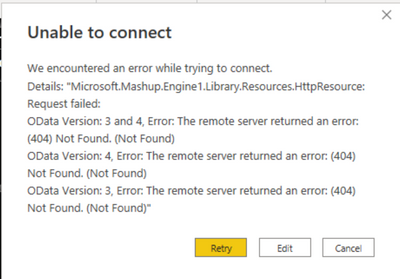
I am calling an excel which is placed in sharepoint and developed the report. The URL was accessed fine and i have deployed the report. Recently after 2 months, i got an error in my report while accessig that same sharepoint URL. Error as per below screenshot.
Kindly help me to sort out this issue
Thanks,
Are you using the URL from when you open the file in the desktop app? The one that ends in ?web=1 (that you delete).
In any case, use the SharePoint folder connector instead, replacing @ and . in your email.
Yes. That happens sometimes with some sources. To get there in this case, go to the query editor and start a new blank query. In the Formula Bar (check the box in View tab if you don't see it) and write the first line of your query like = Web.Contents("<your url>")
You should then get the error but also a button you can click to Edit Crendentials for that source.
Did I answer your question? Mark my post as a solution! Kudos are also appreciated!
Check out the November 2025 Power BI update to learn about new features.
Advance your Data & AI career with 50 days of live learning, contests, hands-on challenges, study groups & certifications and more!