Forum Discussion

Getting ERROR A function 'CALCULATE' has been used in a True/False expression that is used...
Hello All,
I would like to show the card values as
if current month value is not availble then it should compare with the previous month value automatically.
like
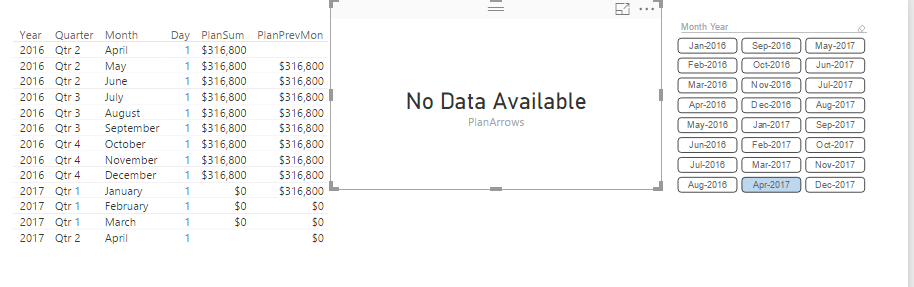
In above image Apr-2017 value is not available then it should compare with the Mar-2017 value.
If Mar-2017 value also not available then the previous month value.Keep on goes.
And onemore thing is I dont want to use the slicer anymore. Actually I am not going to use the slicer.
I just want to show the month comaprision value in a card visuals.
i would like to give info of what kind of data that i am having.
I am having table's plan rev, actual rev, and MonthYear
I have creatd relashionship using Date column from MonthYear table to plan rev and actual rev Date coloumns.
MonthYear table

And in plan rev, month year, plan rev, date, and in actual rev actual rev, month year, and date columns.
Then written measures for
PlanSum = SUM('Revenue Report'[Planned Rev])PlanPrevMon = CALCULATE([PlanSum],PREVIOUSMONTH('Month Year'[Date]))
FILTERDATESTART= FIRSTDATE('MonthYear'[Date])FILTERDATEEND= LASTDATE('MonthYear'[Date])Then for current month PlanArrows measure is.
PlanArrows = CALCULATE(
	IF(
		ISBLANK([PlanSum]),"No data Available",[PlanSum]
	)& " "& IF(
		[PlanSum]=[PlanPrevMon],
		"",
		IF([PlanSum]>[PlanPrevMon],
			UNICHAR(8679),
			UNICHAR(8681)
		) & IF([PlanSum]<=0,
		"",""
		)
	),
	'Month Year'[Date]>=FILTERDATESTART,
        'Month Year'[Date]<=FILTERDATEEND
)
But it is not working. Getting the error as
A function 'CALCULATE' has been used in a True/False expression that is used as a table filter expression. This is not allowed.
Any Suggestions please
Mohan V
Hi Anonymous,
Could you try the formula below to see if it works? :smileyhappy:
PlanArrows =
VAR s = [FILTERDATESTART]
VAR e = [FILTERDATEEND]
RETURN
    CALCULATE (
        IF ( ISBLANK ( [PlanSum] ), "No data Available", [PlanSum] ) & " "
            & IF (
                [PlanSum] = [PlanPrevMon],
                "",
                IF ( [PlanSum] > [PlanPrevMon], UNICHAR(8679), UNICHAR(8681) )
                    & IF ( [PlanSum] <= 0, "", "" )
            ),
        'Month Year'[Date] >= s
            && 'Month Year'[Date] <= e
    )
Regards
1 Reply
 v-ljerr-msft
Microsoft Employee
Hi Anonymous,
Could you try the formula below to see if it works? :smileyhappy:
PlanArrows =
VAR s = [FILTERDATESTART]
VAR e = [FILTERDATEEND]
RETURN
    CALCULATE (
        IF ( ISBLANK ( [PlanSum] ), "No data Available", [PlanSum] ) & " "
            & IF (
                [PlanSum] = [PlanPrevMon],
                "",
                IF ( [PlanSum] > [PlanPrevMon], UNICHAR(8679), UNICHAR(8681) )
                    & IF ( [PlanSum] <= 0, "", "" )
            ),
        'Month Year'[Date] >= s
            && 'Month Year'[Date] <= e
    )
Regards