Join us at FabCon Atlanta from March 16 - 20, 2026, for the ultimate Fabric, Power BI, AI and SQL community-led event. Save $200 with code FABCOMM.
Register now!The Power BI Data Visualization World Championships is back! Get ahead of the game and start preparing now! Learn more
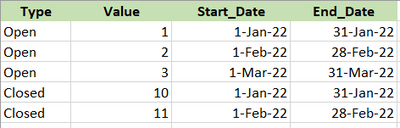
Hi How to get Value for each Type based on max date from column End_Date
This should be 2 measure, because will use it in card visual separetely
Measure1_Open : value 3 , because max date from End_Date = 31 Mar 2022
Measure2_Closed : value 11, because max date from End_Date = 28 Feb 2022
Thank
Solved! Go to Solution.
Hi @Anonymous ,
I think standard CALCULATE should work. Something like:
Measure1_Open = CALCULATE(SUM('Table'[Value]),LATESTDATE('Table'[End_Date]),'Table'[Type]="Open")
The same logic applies for the second measure.
I wrote this on my phone so if its not working, let me know and I will re-check from my pc.
Hi @Anonymous ,
I think standard CALCULATE should work. Something like:
Measure1_Open = CALCULATE(SUM('Table'[Value]),LATESTDATE('Table'[End_Date]),'Table'[Type]="Open")
The same logic applies for the second measure.
I wrote this on my phone so if its not working, let me know and I will re-check from my pc.
It's solved, I modify it a bit
Measure1_Open = CALCULATE(SUM('Table'[Value]),LASTDATE('Table'[End_Date]),'Table'[Type]="Open")
The Power BI Data Visualization World Championships is back! Get ahead of the game and start preparing now!
Check out the November 2025 Power BI update to learn about new features.
| User | Count |
|---|---|
| 59 | |
| 43 | |
| 42 | |
| 23 | |
| 17 |
| User | Count |
|---|---|
| 190 | |
| 122 | |
| 96 | |
| 66 | |
| 47 |