Join us at FabCon Atlanta from March 16 - 20, 2026, for the ultimate Fabric, Power BI, AI and SQL community-led event. Save $200 with code FABCOMM.
Register now!The Power BI Data Visualization World Championships is back! Get ahead of the game and start preparing now! Learn more
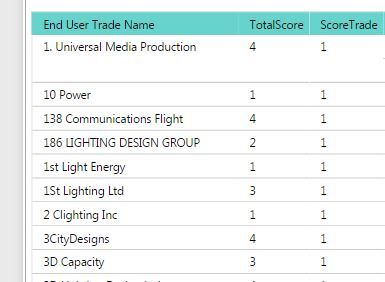
Here is the requirement. I have the below matrix from a dataset containing some text values in End User Trade Name.
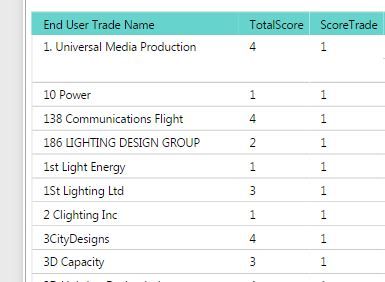
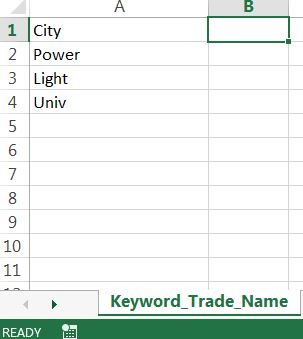
The 3rd column contains a score and it is set to 1 for a selected group of texts that is coming from another excel file.
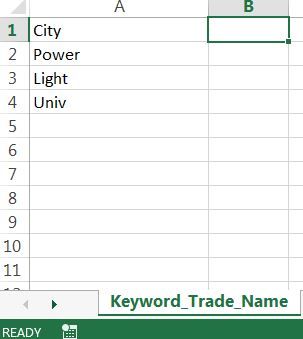
I have a table named the same in my Report and when the text matches it to the one in the list, the score is set to 1 for that entry. The excel is for the purpose that anyone can enter the values and just have to do a refresh in the Power BI to update the score for those set of values.
Below is the code that is doing it -
ScoreTrade = IF(
SUMX(Keyword_Trade_Name,
FIND(
UPPER(Keyword_Trade_Name[Trade_Name]),
UPPER(Table_Test[End User Trade Name])
,,0
)
) > 0,
1,
0
)
I am hardcoding the value to be 1(in bold above) in this case here but I don't want it to do that way. I want it to be taken from an excel file and the value can be set by the user (maybe 2 , 3 but same for all the keywords in that table). Can you suggest a way to do that so that I don't have to hardcode it but maybe use the same excel sheet to add another column with the value ?
Solved! Go to Solution.
I am hardcoding the value to be 1(in bold above) in this case here but I don't want it to do that way. I want it to be taken from an excel file and the value can be set by the user (maybe 2 , 3 but same for all the keywords in that table).
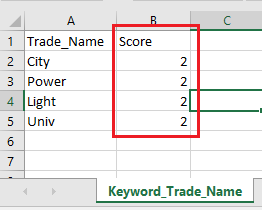
According to your description, you should be able to use the same excel sheet "Keyword_Trade_Name" to add another column called Score with the value like below.
Then use MAX function which returns the largest numeric value in a column(as the Score value is the same for all the keywords in that table, it will return that value) like below to calculate "ScoreTrade" for "End User Trade Name".
ScoreTrade =
IF (
SUMX (
Keyword_Trade_Name,
FIND (
UPPER ( Keyword_Trade_Name[Trade_Name] ),
UPPER ( Table_Test[End User Trade Name] ),
,
0
)
)
> 0,
MAX ( Keyword_Trade_Name[Score] ),
0
)Regards
Here is the requirement. I have the below matrix from a dataset containing some text values in End User Trade Name.
The 3rd column contains a score and it is set to 1 for a selected group of texts that is coming from another excel file.
I have a table named the same in my Report and when the text matches it to the one in the list, the score is set to 1 for that entry. The excel is for the purpose that anyone can enter the values and just have to do a refresh in the Power BI to update the score for those set of values.
Below is the code that is doing it -
ScoreTrade = IF(
SUMX(Keyword_Trade_Name,
FIND(
UPPER(Keyword_Trade_Name[Trade_Name]),
UPPER(Table_Test[End User Trade Name])
,,0
)
) > 0,
1,
0
)
I am hardcoding the value to be 1(in bold above) in this case here but I don't want it to do that way. I want it to be taken from an excel file and the value can be set by the user (maybe 2 , 3 but same for all the keywords in that table). Can you suggest a way to do that so that I don't have to hardcode it but maybe use the same excel sheet to add another column with the value ?
I am hardcoding the value to be 1(in bold above) in this case here but I don't want it to do that way. I want it to be taken from an excel file and the value can be set by the user (maybe 2 , 3 but same for all the keywords in that table).
According to your description, you should be able to use the same excel sheet "Keyword_Trade_Name" to add another column called Score with the value like below.
Then use MAX function which returns the largest numeric value in a column(as the Score value is the same for all the keywords in that table, it will return that value) like below to calculate "ScoreTrade" for "End User Trade Name".
ScoreTrade =
IF (
SUMX (
Keyword_Trade_Name,
FIND (
UPPER ( Keyword_Trade_Name[Trade_Name] ),
UPPER ( Table_Test[End User Trade Name] ),
,
0
)
)
> 0,
MAX ( Keyword_Trade_Name[Score] ),
0
)Regards
Hi @v-ljerr-msft,
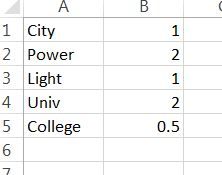
Thanks for the solution, now my Director wants it to be more dynamic.
So now the data should look something like this
Is there a way to extract the possible values in the above manner ?
Thanks a lot for your help.
Hi All,
Here is the requirement. I have the below matrix from a dataset containing some text values in End User Trade Name.
The 3rd column contains a score and it is set to 1 for a selected group of texts that is coming from another excel file.
I have a table named the same in my Report and when the text matches it to the one in the list, the score is set to 1 for that entry. The excel is for the purpose that anyone can enter the values and just have to do a refresh in the Power BI to update the score for those set of values.
Below is the code that is doing it -
ScoreTrade = IF(
SUMX(Keyword_Trade_Name,
FIND(
UPPER(Keyword_Trade_Name[Trade_Name]),
UPPER(Table_Test[End User Trade Name])
,,0
)
) > 0,
1,
0
)
I am hardcoding the value to be 1(in bold above) in this case here but I don't want it to do that way. I want it to be taken from an excel file and the value can be set by the user (maybe 2 , 3 but same for all the keywords in that table). Can you suggest a way to do that so that I don't have to hardcode it but maybe use the same excel sheet to add another column with the value ?
Check out the November 2025 Power BI update to learn about new features.
Advance your Data & AI career with 50 days of live learning, contests, hands-on challenges, study groups & certifications and more!
| User | Count |
|---|---|
| 58 | |
| 45 | |
| 40 | |
| 21 | |
| 18 |