Join us at FabCon Atlanta from March 16 - 20, 2026, for the ultimate Fabric, Power BI, AI and SQL community-led event. Save $200 with code FABCOMM.
Register now!The Power BI Data Visualization World Championships is back! Get ahead of the game and start preparing now! Learn more
| App no | Dates | ||
| 2333 | 15th March,2022 | ||
| 2333 | 13th March,2023 | ||
| 2555 | 13th March,2021 | ||
| 2555 | 14th March,2022 |
I want to return values with max date with respect to app no for example the below table shows the representation of values to return I utilized List.Max but it gives max for whole column I want it to compare wrt App no
But the dates are in the different tables and the data is coming with the direct query
| 2333 | 13th March,2023 |
| 2555 | 14th March,2022 |
Solved! Go to Solution.
Hi @dshah12 ,
Here are the steps you can follow:
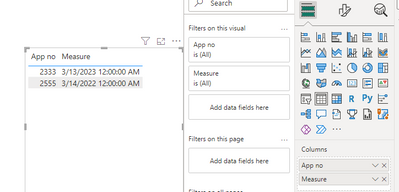
Create measure.
Measure =
MAXX(
FILTER(ALL('Table'),
'Table'[App no]=MAX('Table'[App no])),[Dates])
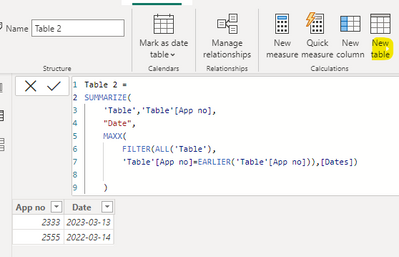
Create calculated table.
Table 2 =
SUMMARIZE(
'Table','Table'[App no],
"Date",
MAXX(
FILTER(ALL('Table'),
'Table'[App no]=EARLIER('Table'[App no])),[Dates])
)
Best Regards,
Liu Yang
If this post helps, then please consider Accept it as the solution to help the other members find it more quickly
Hi @dshah12 ,
Here are the steps you can follow:
Create measure.
Measure =
MAXX(
FILTER(ALL('Table'),
'Table'[App no]=MAX('Table'[App no])),[Dates])
Create calculated table.
Table 2 =
SUMMARIZE(
'Table','Table'[App no],
"Date",
MAXX(
FILTER(ALL('Table'),
'Table'[App no]=EARLIER('Table'[App no])),[Dates])
)
Best Regards,
Liu Yang
If this post helps, then please consider Accept it as the solution to help the other members find it more quickly
What to do if Application number and Date is in different tables
Hi dshah12,
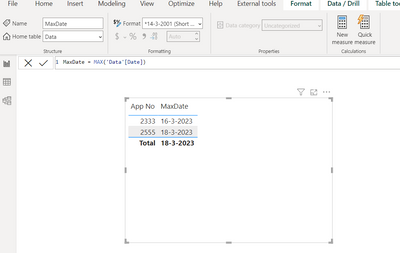
Simple MAX function will give this requried output. Please refer to the below snapshot.
Appreciate a Kudos!
If this helps and resolves the issue, please mark it as a Solution!
Regards,
N V Durga Prasad
Thanks but it gives max for whole column instead of specific App No
The Power BI Data Visualization World Championships is back! Get ahead of the game and start preparing now!
Check out the November 2025 Power BI update to learn about new features.
| User | Count |
|---|---|
| 59 | |
| 46 | |
| 42 | |
| 23 | |
| 17 |
| User | Count |
|---|---|
| 190 | |
| 122 | |
| 96 | |
| 66 | |
| 47 |