Join us at FabCon Atlanta from March 16 - 20, 2026, for the ultimate Fabric, Power BI, AI and SQL community-led event. Save $200 with code FABCOMM.
Register now!Get Fabric Certified for FREE during Fabric Data Days. Don't miss your chance! Request now
| Page | Group name | Phrase | Mentions |
| a | Graphics cards | Nvidia | 310 |
| a | Graphics cards | Asus 1080 | 21 |
| a | Graphics cards | Intel | 10 |
| a | Monitors | HDMI | 840 |
| a | Monitors | HD | 240 |
| a | Monitors | Wide screen | 22 |
| a | TV | Samsung | 103 |
| a | TV | Curved | 5 |
| a | TV | 4k | 2 |
| b | Graphics cards | gtx | 260 |
| b | Graphics cards | Radeon | 110 |
| b | Graphics cards | Intel | 20 |
| b | Laptops | hp | 1,100 |
| b | Laptops | MSI | 210 |
| b | Laptops | tablets | 130 |
| b | TV | HD | 240 |
| b | TV | Samsung | 103 |
| b | TV | 1080p | 80 |
| Page | Group name | Top Phrase | Mentions | Total mentions for page | % of total |
| a | Graphics cards | Nvidia | 310 | 341 | 91% |
| a | Monitors | HDMI | 840 | 1102 | 76% |
| a | TV | Samsung | 103 | 110 | 94% |
| b | Graphics cards | gtx | 260 | 390 | 67% |
| b | Laptops | hp | 1,100 | 1140 | 96% |
| b | TV | HD | 240 | 423 | 57% |
Solved! Go to Solution.
Hi @warrencowan,
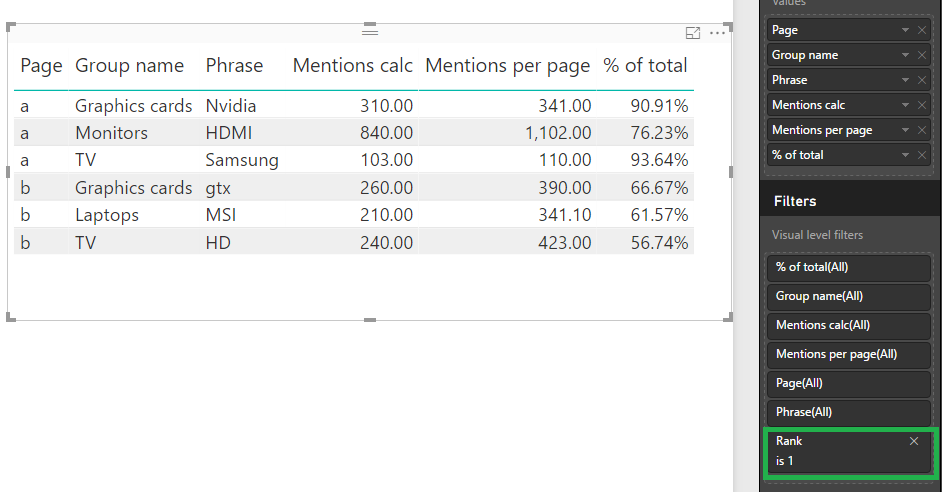
I have made this in 3 measure in order to have a complete explanation of your table:
Rank =
RANKX (
ALL ( Talked[Phrase] ),
CALCULATE ( SUM ( Talked[Mentions] ) )
)Place this measure on the visual level filter and select all the values that are equal to 1.
Mentions calc = MAX(Talked[Mentions])
Mentions per page =
VAR Page = MAX ( Talked[Page] )
VAR Groups = MAX ( Talked[Group name] )
RETURN
CALCULATE (
SUM ( Talked[Mentions] ),
Talked[Page] = Page,
Talked[Group name] = Groups,
ALL ( Talked )
)Then just add your column to your table, be aware that if you want to have a total line in the table the expression above need to be changed.
The final result is below
Regards,
MFelix
Regards
Miguel Félix
Proud to be a Super User!
Check out my blog: Power BI em PortuguêsHi @warrencowan,
I have made this in 3 measure in order to have a complete explanation of your table:
Rank =
RANKX (
ALL ( Talked[Phrase] ),
CALCULATE ( SUM ( Talked[Mentions] ) )
)Place this measure on the visual level filter and select all the values that are equal to 1.
Mentions calc = MAX(Talked[Mentions])
Mentions per page =
VAR Page = MAX ( Talked[Page] )
VAR Groups = MAX ( Talked[Group name] )
RETURN
CALCULATE (
SUM ( Talked[Mentions] ),
Talked[Page] = Page,
Talked[Group name] = Groups,
ALL ( Talked )
)Then just add your column to your table, be aware that if you want to have a total line in the table the expression above need to be changed.
The final result is below
Regards,
MFelix
Regards
Miguel Félix
Proud to be a Super User!
Check out my blog: Power BI em PortuguêsThnx MFelix, that's worked a treat, and I dont think I'd have come up with that in 6 months of Sundays.
Check out the November 2025 Power BI update to learn about new features.
Advance your Data & AI career with 50 days of live learning, contests, hands-on challenges, study groups & certifications and more!