
This time we’re going bigger than ever. Fabric, Power BI, SQL, AI and more. We're covering it all. You won't want to miss it.
Learn moreDid you hear? There's a new SQL AI Developer certification (DP-800). Start preparing now and be one of the first to get certified. Register now
Dear All
Please note that when i get the data from the SharePoint list the date in powerBI appears one day before the correct date.
e.g in SharePoint, the date is 1 December 2022 and in powerBI it appears 30 November 2022.
Please advise
Also, what is the difference between getting the data from SharePoint list and SharePoint online list?
Thank you
Thank you for your reply.
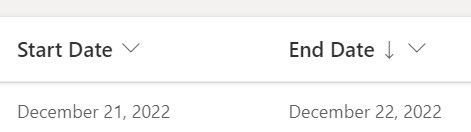
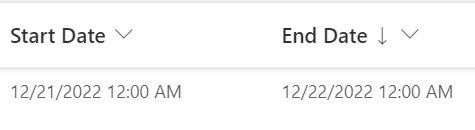
Please note that the problem is that the difference is one day and not hours. Please see the attached photoes
but still this difference could be 1 hour...
Can you check the second table with Date/Time format?
It's 1 hour so I'm pretty sure it is a timezone issue.
You can check your Sharepoint settings: https://sharepointmaven.com/sharepoint-time-zone/
Or you can adjust it in your guery: https://community.powerbi.com/t5/Service/Incorrect-Time-Zone-setting-at-Power-BI-Service/m-p/2345390...
Hello,
You could check this solution to see the difference SharePoint list and SharePoint online list.
https://community.powerbi.com/t5/Desktop/Difference-between-Sharepoint-list-vs-Sharepoint-Online-Lis...
If I answered your question, please mark my post as solution so it would appeare to others, Appreciate your Kudos👍
Proud to be a Super User! | |
Thank you for your answer regarding the difference between both of lists. much appreciated
What about the date that I get in power BI is less than the sharepoint list by one day? 🙂
Thank you
Hi @ahmad1987 ,
I think your problem is that powerbi gets the data in UTC.
You have to adjust the data to your local time zone.
You can read about this here: https://radacad.com/solving-dax-time-zone-issue-in-power-bi
Check out the April 2026 Power BI update to learn about new features.
Sign up to receive a private message when registration opens and key events begin.
If you have recently started exploring Fabric, we'd love to hear how it's going. Your feedback can help with product improvements.
| User | Count |
|---|---|
| 34 | |
| 31 | |
| 30 | |
| 21 | |
| 16 |
| User | Count |
|---|---|
| 65 | |
| 53 | |
| 31 | |
| 23 | |
| 23 |