cancel
Showing results for 
Search instead for 
Did you mean: 

July 28 - August 9 | Final Round of the Power BI Dataviz World Championships. This is your chance. Learn more

Reply
smerchant
Helper I
Helper I

Get First and Last Rows with all Columns

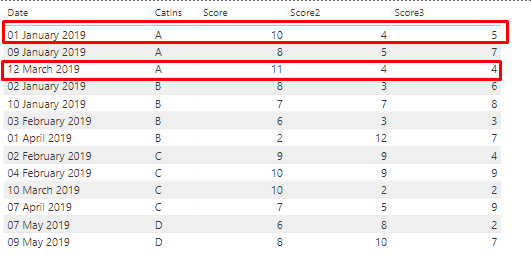
I have data something like this and I want get the first and last rows based on the date:

powerbi1.png

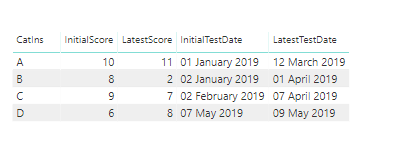
I created some measure for example like InitialScore, LastScore, FirstDate...: 

InitialScore = 
MINX(
    FILTER(
        ALL(Sheet1),
        [CatIns] = EARLIER([CatIns]) 
        && [Date] = EARLIER(Sheet1[InitialTestDate])),
        [Score])

And got results like this which is correct but..:

powerbi2.png

I have score2, 3 and more columns in the real data and I don't think should be creating measures for each column?  Is there a way to get all the rows filtered by first and last row by Category (CatIns)?


Thanks,

1 ACCEPTED SOLUTION
Anonymous
Not applicable

HI @smerchant ,

You can consider to do unpivot columns on your fields, then you can simply write formula to calculate first/last records based on original category and attribute group.

Unpivot columns (Power Query)

Regards,

Xiaoxin Sheng

View solution in original post

5 REPLIES 5
parry2k
Super User
Super User

@smerchant measure or column will only return scalar value not a row


Subscribe to the @PowerBIHowTo YT channel for an upcoming video on List and Record functions in Power Query!!

Learn Power BI and Fabric - subscribe to our YT channel - Click here: @PowerBIHowTo

If my solution proved useful, I'd be delighted to receive Kudos. When you put effort into asking a question, it's equally thoughtful to acknowledge and give Kudos to the individual who helped you solve the problem. It's a small gesture that shows appreciation and encouragement! ❤


Did I answer your question? Mark my post as a solution. Proud to be a Super User! Appreciate your Kudos 🙂
Feel free to email me with any of your BI needs.

Thanks.  I might have failed to explain.  I need to get all the columns and only first and last row by category based on the date (first and lastest)


I made another attempt through an identifier column. Not sure if this is most appropriate way, although, I do get the empty row on top which I suppose I can filter out.

powerbi3.png

Identifier = 
IF (
    MIN ( Sheet1[Date] ) = Sheet1[FirstTransactionDate],
    "First Test",
    IF (
        MAX ( Sheet1[Date] ) = Sheet1[LastTransactionDate],
        "Last Test",
        BLANK ()
    )
)

This attempt also give the wrong sum for score columns

@smerchant issue with your question is to get all columns in a row, it is possible to get a column, not a problem, and you have to perform the same calculation for all the columns. 


Subscribe to the @PowerBIHowTo YT channel for an upcoming video on List and Record functions in Power Query!!

Learn Power BI and Fabric - subscribe to our YT channel - Click here: @PowerBIHowTo

If my solution proved useful, I'd be delighted to receive Kudos. When you put effort into asking a question, it's equally thoughtful to acknowledge and give Kudos to the individual who helped you solve the problem. It's a small gesture that shows appreciation and encouragement! ❤


Did I answer your question? Mark my post as a solution. Proud to be a Super User! Appreciate your Kudos 🙂
Feel free to email me with any of your BI needs.

Thanks.  Even if you have 20 columns?  is it possible to create a seperate table based on the condition/filter which gets updated?


Anonymous
Not applicable

HI @smerchant ,

You can consider to do unpivot columns on your fields, then you can simply write formula to calculate first/last records based on original category and attribute group.

Unpivot columns (Power Query)

Regards,

Xiaoxin Sheng

Helpful resources

Announcements
Fabric Community Sticker Design Challenge Barcelona Carousel

Fabric Community Sticker Challenge - Barcelona 2026

If you love stickers, then you will definitely want to check out our community sticker challenge, Barcelona edition!

July Power BI Update Carousel

Power BI Monthly Update - July 2026

Check out the July 2026 Power BI update to learn about new features.

Power BI DataViz World Championships carousel

Power BI DataViz World Championships - June 2026

A new Power BI DataViz World Championship is coming this June! Don't miss out on submitting your entry.

Top Solution Authors