Don't miss your chance to take the Fabric Data Engineer (DP-600) exam for FREE! Find out how by watching the DP-600 session on-demand now through April 28th.
Learn moreJoin the FabCon + SQLCon recap series. Up next: Power BI, Real-Time Intelligence, IQ and AI, and Data Factory take center stage. All sessions are available on-demand after the live show. Register now
Hi ,
I need to connect to an API and pull data from it.
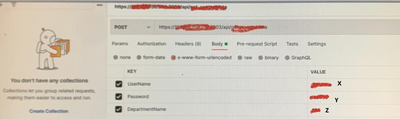
The API needs few parameters. (UserName,Password,DepartmentName)
I can connect from postman(screenshot attached)
How do i connect to the API from power bi and pass the patrameters(X,Y,Z) to it.
TNX
Solved! Go to Solution.
Hi @RsimonAlign ,
If you want to get data through API in power bi desktop, may be these link can help you to refer:
powerbi - how to connect my web api wtih Power BI Reports? - Stack Overflow
Web.Contents - PowerQuery M | Microsoft Docs
Best regards,
Community Support Team Selina zhu
If this post helps, then please consider Accept it as the solution to help the other members find it more quickly.
Hi @RsimonAlign ,
If you want to get data through API in power bi desktop, may be these link can help you to refer:
powerbi - how to connect my web api wtih Power BI Reports? - Stack Overflow
Web.Contents - PowerQuery M | Microsoft Docs
Best regards,
Community Support Team Selina zhu
If this post helps, then please consider Accept it as the solution to help the other members find it more quickly.
I tried this but i get an Error
DataSource.Error: The underlying connection was closed: Could not establish trust relationship for the SSL/TLS secure chanel.
Details :
https:// MY API URL
Write below M Code in Power Query Advanced Editor...
let
url = "Your URL",
body = "{
""UserName"":""___"",
""Password"":""___"",
""DepartmentName"":""___""
}",
Source = Json.Document(
Web.Contents(
url,
[Headers = [#"Content-Type"="application/json"],
Content = Text.ToBinary(body)]
)
)
in
Source
Check out the April 2026 Power BI update to learn about new features.
If you have recently started exploring Fabric, we'd love to hear how it's going. Your feedback can help with product improvements.
A new Power BI DataViz World Championship is coming this June! Don't miss out on submitting your entry.
| User | Count |
|---|---|
| 45 | |
| 38 | |
| 34 | |
| 21 | |
| 17 |
| User | Count |
|---|---|
| 66 | |
| 65 | |
| 31 | |
| 26 | |
| 26 |