cancel
Showing results for 
Search instead for 
Did you mean: 

The Power BI Data Visualization World Championships is back! Get ahead of the game and start preparing now! Learn more

Reply
sfbloo
Frequent Visitor

Get Data from Gerrit REST API available over HTTP - cannot authentificate

Hi,


I am trying to get data from the json returned when calling the Gerrit rest api endpoint.

When doing a GET request from a REST client, the response is correctly returning the json.

The gerrit server is in a corporate network, but I am connected to the same when trying to get data.


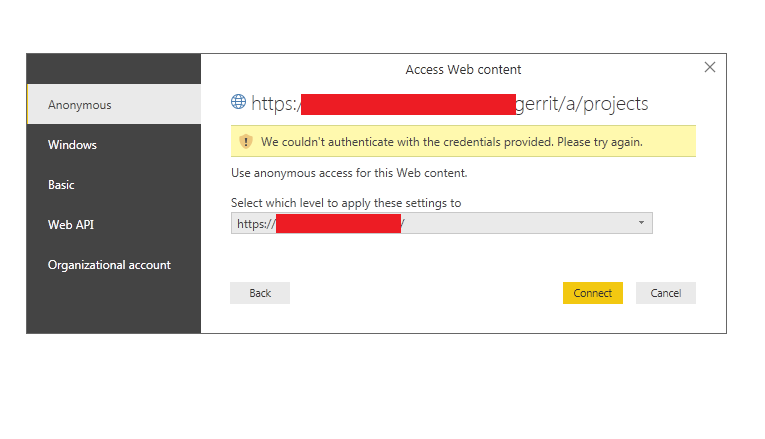
Please see below screenshots for the same:

powerBI_Auth.pngI have tried authentification with Organizational account and Basic, but no success.

Please advise how I can proceed.


EDIT: Tested from postman and seems like the mozilla extension was using my cached HTTP password.

From postman I was only able to successfully send a GET request using Digest Auth.


Is Digest Authentification supported in any way from Power Bi?

3 REPLIES 3
sfbloo
Frequent Visitor

Solution was actually pretty straight forward:

Get Data> Web > Advanced > URL part (the api link) > HTTP request header parameters: Authorization Digest option


EDIT: Was happy to get the data in the query editor, but as soon as I wanted to apply the changes I was prompted for the credentials again. Using Anonymous connection is not working.


Please advise.

Hi @sfbloo,

We are currently looking into this issue and will give you an update as soon as possible. Thank you for your understanding and support.

Best Regards,
Angelia

Hello,


I am still struggling with the Digest authentification, any updates on the same? 


A few more details, the issue from the refresh is that in the Header of the authentification I have added a nounce (required for the digest authentification) which expires. I need to be able to capture the nounce that the server sends in the response header in case of HTTP 401, so that I can re-construct the Header for the request.


Currently, I am trying to handle the HTTP 401 code, as per the following:

let
Source = Web.Contents(URL, [Headers=[Authorization="Digest username=""USERNAME"", realm=""REALM"", nonce=""NOUNCE"", uri=""URI"", qop=auth, nc=, cnonce="""", response=""RESPONSE"", opaque="""""],
ManualStatusHandling={401}]),
ResponseMeta = Value.Metadata(Source),
ResponseStatus = ResponseMeta[Response.Status]
in
ResponseStatus


However the responseStatus comes back as null, while it should be 401 code. All the reponse fileds are also null.


Any suggestions how I can achive my goal of using Digest authentification?


Thank you.

Helpful resources

Announcements
Power BI DataViz World Championships

Power BI Dataviz World Championships

The Power BI Data Visualization World Championships is back! Get ahead of the game and start preparing now!

November Power BI Update Carousel

Power BI Monthly Update - November 2025

Check out the November 2025 Power BI update to learn about new features.

FabCon Atlanta 2026 carousel

FabCon Atlanta 2026

Join us at FabCon Atlanta, March 16-20, for the ultimate Fabric, Power BI, AI and SQL community-led event. Save $200 with code FABCOMM.