cancel
Showing results for 
Search instead for 
Did you mean: 

Learn from the best! Meet the four finalists headed to the FINALS of the Power BI Dataviz World Championships! Register now

Reply
kbrewer
Frequent Visitor

Get Data from Excel File

Is it possible to Get only a select number of columns in an Excel File without bringing in the entire page to Power BI Desktop? For example, i have an excel file that my coworker updates. on the left side of the excel sheet he has a " raw data " form of data and to the right of that he has tables that have formulas that add up different parts of the "raw data " next t it. is it possible for me to just select the left "raw data" side of the excel file and bring that in without bringing in the full sheet? 

1 ACCEPTED SOLUTION
Greg_Deckler
Community Champion
Community Champion

Sure, just pull it up in Query Editor, select the columns that you want and then right-click and Remove Other Columns.


Follow on LinkedIn
@ me in replies or I'll lose your thread!!!
Instead of a Kudo, please vote for this idea
Become an expert!: Enterprise DNA
External Tools: MSHGQM
YouTube Channel!: Microsoft Hates Greg
Latest book!:
DAX For Humans

DAX is easy, CALCULATE makes DAX hard...

View solution in original post

2 REPLIES 2
v-huizhn-msft
Microsoft Employee
Microsoft Employee

Hi @kbrewer,

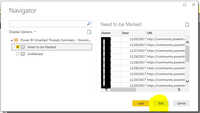
As what @Greg_Deckler said, when you get data from excel, please select the sheet or table name, then click Edit(highlighted in yellow background), you will go to Edit Quey, you can remove any columns you don't need.

1.PNG

Best Regards,
Angelia

Greg_Deckler
Community Champion
Community Champion

Sure, just pull it up in Query Editor, select the columns that you want and then right-click and Remove Other Columns.


Follow on LinkedIn
@ me in replies or I'll lose your thread!!!
Instead of a Kudo, please vote for this idea
Become an expert!: Enterprise DNA
External Tools: MSHGQM
YouTube Channel!: Microsoft Hates Greg
Latest book!:
DAX For Humans

DAX is easy, CALCULATE makes DAX hard...

Helpful resources

Announcements
Join our Fabric User Panel

Join our Fabric User Panel

Share feedback directly with Fabric product managers, participate in targeted research studies and influence the Fabric roadmap.

February Power BI Update Carousel

Power BI Monthly Update - February 2026

Check out the February 2026 Power BI update to learn about new features.

FabCon Atlanta 2026 carousel

FabCon Atlanta 2026

Join us at FabCon Atlanta, March 16-20, for the ultimate Fabric, Power BI, AI and SQL community-led event. Save $200 with code FABCOMM.