This is best Fabric, Power BI, SQL and AI community event. How do we know? The last event sold out! Save €200 with code FABCMTY200.
Register nowA new Data Days event is coming soon! This time we’re going bigger than ever. Fabric, Power BI, SQL, AI and more. Don't miss out.
Morning everybody!
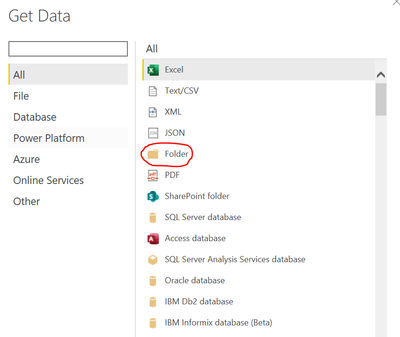
Refer to the subject, i don't really know how to get data (efficient way) from a folder. Below i will give an example;
First step.
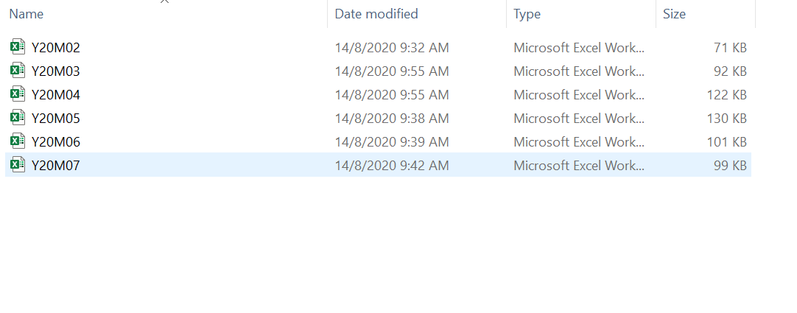
This is the location of the file. This file i named it "ACTUAL".
So as we can see, this show that it get all the files inside the folder right?
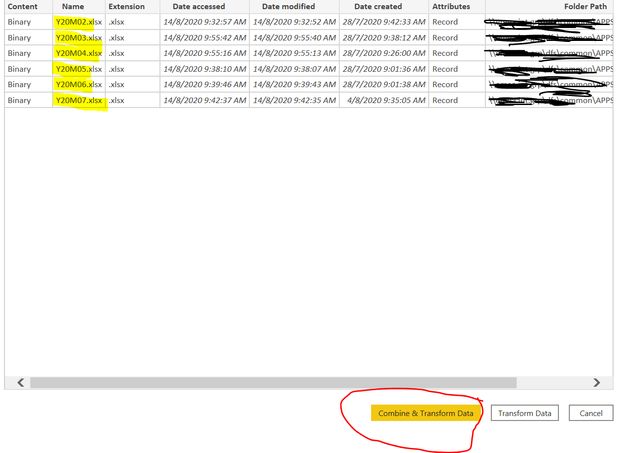
So here is the real problem. At the drop down menu, do i need to choose one-by-one of the files to load it? because when i try click at "first file Y20M20", it only load that file. What i really want is it can load & combine all of the files. The column name for all the files is exactly same.
So is there any way that i can try?
Solved! Go to Solution.
Hi @New_be ,
The file you will choose behind "Sample File" is used to determine the correct file format to use, such as text, Excel workbook, or JSON file. And you don't need to choose one-by-one of the files to load it , just click option "Combine & Transform Data ".
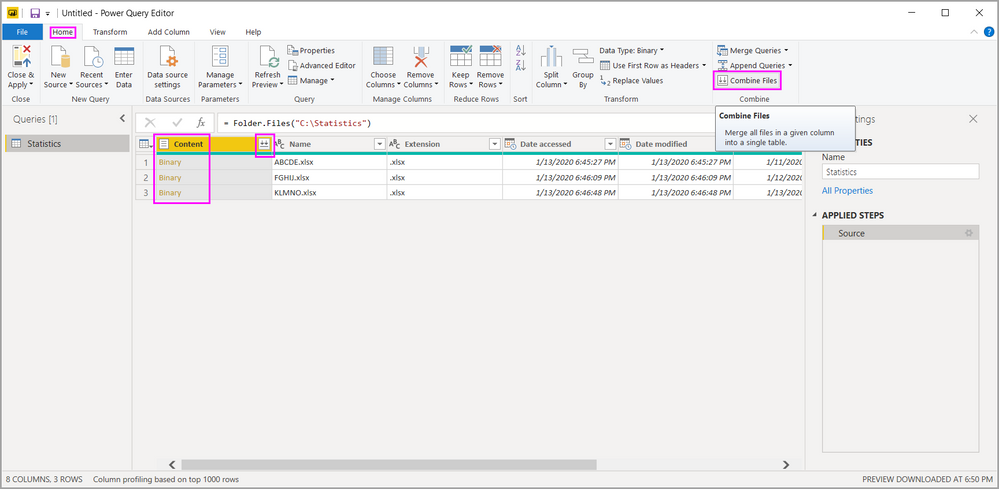
To combine binary files in Power Query Editor, select Content (the first column label) and select Home > Combine Files. Or you can just select the Combine Files icon next to Content.
For reference:
Combine files (binaries) in Power BI Desktop
Best Regards,
Amy
Community Support Team _ Amy
If this post helps, then please consider Accept it as the solution to help the other members find it more quickly.
Hi New_be,
I usually select Transform Data from the dialog.
In the Query Editor, I then click on the Combine Files at the column header of the Content Column.
So far I didn't have issue using this approach.
Hope that helps.
Regards,
Jeff Ong
Hi @New_be
Check the below link
https://www.youtube.com/watch?time_continue=134&v=9sfCDCpWTfc&feature=emb_logo
Did I resolve your issue? Mark my post as a solution! Appreciate your Kudos, Press the thumbs up button!!
Regards,
Pranit
Check out the May 2026 Power BI update to learn about new features.
Sign up to receive a private message when registration opens and key events begin.
If you have recently started exploring Fabric, we'd love to hear how it's going. Your feedback can help with product improvements.
| User | Count |
|---|---|
| 29 | |
| 27 | |
| 25 | |
| 19 | |
| 14 |
| User | Count |
|---|---|
| 53 | |
| 47 | |
| 31 | |
| 20 | |
| 19 |