Join us at FabCon Atlanta from March 16 - 20, 2026, for the ultimate Fabric, Power BI, AI and SQL community-led event. Save $200 with code FABCOMM.
Register now!Vote for your favorite vizzies from the Power BI Dataviz World Championship submissions. Vote now!
How can i show only available countries from the database over geomap rather than shwoing whole geomap. Also i wanted to show tooltip when i hover the mouse on that particular country.
Hello @Anonymous ,
First thing is add more details to your question. There are different map visuals available in Power BI, so hard to understand which one you are talking about. Refer follwinh article on how to add etails to your question:
https://community.powerbi.com/t5/Desktop/How-to-Get-Your-Question-Answered-Quickly/m-p/1447523
Also, if I go with the map visual in Power BI, you can't just show points/identifiers for limited countries. The job of a map visual is to show the location of a country on world map. So that is what it does.
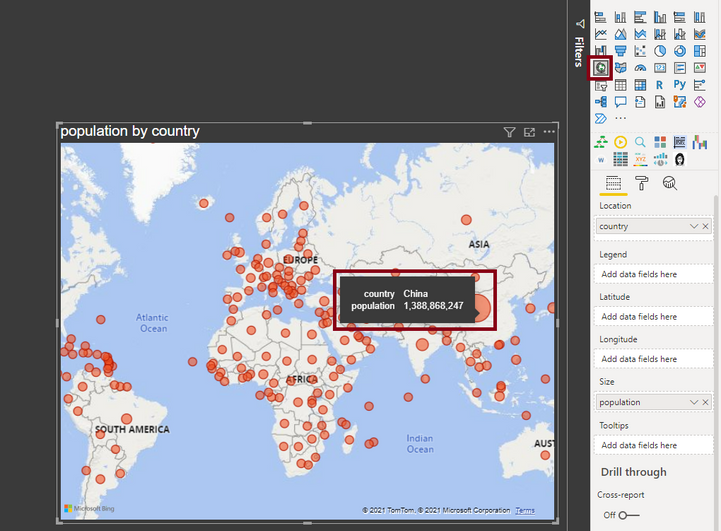
To your 2nd question, yes the tooltips are by-default shown on the map visual, onces you move a value to be displayed by a geographic location on the map visual. See the screenshot below:
Thanks,
Pragati
Vote for your favorite vizzies from the Power BI World Championship submissions!
If you love stickers, then you will definitely want to check out our Community Sticker Challenge!
Check out the January 2026 Power BI update to learn about new features.
| User | Count |
|---|---|
| 63 | |
| 51 | |
| 41 | |
| 23 | |
| 18 |
| User | Count |
|---|---|
| 135 | |
| 110 | |
| 50 | |
| 31 | |
| 29 |