cancel
Showing results for 
Search instead for 
Did you mean: 

Data Days is here! Join us now for 60+ days of learning, challenges, and connection. Learn more

Reply
Anonymous
Not applicable

Geomap

How can i show only available countries from the database over geomap rather than shwoing whole geomap. Also i wanted to show tooltip when i hover the mouse on that particular country.


1 REPLY 1
Pragati11
Super User
Super User

Hello @Anonymous ,


First thing is add more details to your question. There are different map visuals available in Power BI, so hard to understand which one you are talking about. Refer follwinh article on how to add etails to your question:

https://community.powerbi.com/t5/Desktop/How-to-Get-Your-Question-Answered-Quickly/m-p/1447523


Also, if I go with the map visual in Power BI, you can't just show points/identifiers for limited countries. The job of a map visual is to show the location of a country on world map. So that is what it does.

To your 2nd question, yes the tooltips are by-default shown on the map visual, onces you move a value to be displayed by a geographic location on the map visual. See the screenshot below:
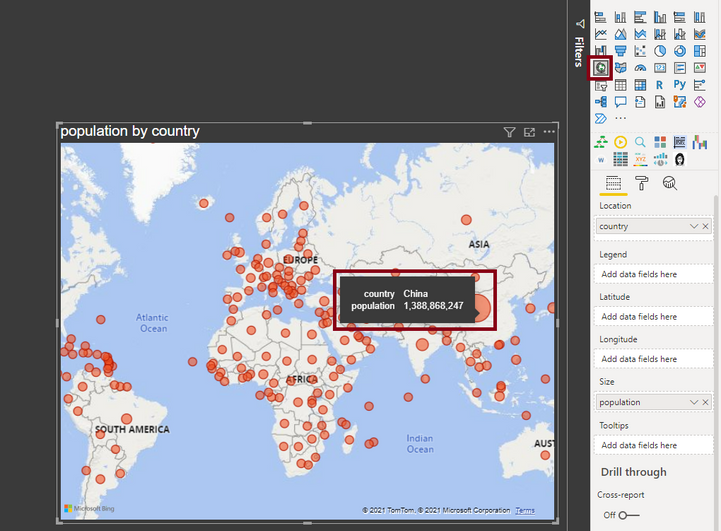
 

Pragati11_0-1640007917091.png


Thanks,

Pragati


Best Regards,

Pragati Jain


MVP logo


LinkedIn | Twitter | Blog YouTube 

Did I answer your question? Mark my post as a solution! This will help others on the forum!

Appreciate your Kudos!!

Proud to be a Super User!!

Helpful resources

Announcements
Fabric Data Days is here Carousel

Fabric Data Days 2026

Don't miss out on Data Days, June 15 through August 7. Learn Fabric, Power BI, SQL, AI and more.

May Power BI Update Carousel

Power BI Monthly Update - May 2026

Check out the May 2026 Power BI update to learn about new features.

Power BI DataViz World Championships carousel

Power BI DataViz World Championships - June 2026

A new Power BI DataViz World Championship is coming this June! Don't miss out on submitting your entry.