Join us at FabCon Atlanta from March 16 - 20, 2026, for the ultimate Fabric, Power BI, AI and SQL community-led event. Save $200 with code FABCOMM.
Register now!The Power BI Data Visualization World Championships is back! Get ahead of the game and start preparing now! Learn more
Consider an Excel blank sheet where cell A1 = 12, and we define a condition for cell B1 =IF(A1>10,"Cell is greater than 10", "Cell is less than 10"). Result for cell B1 = Cell is greater than 10.
How do I achieve this on Power BI, in a simple table format just like in Excel, preferably multiple lines with conditions and results like the above.
Solved! Go to Solution.
Hi @bmk ,
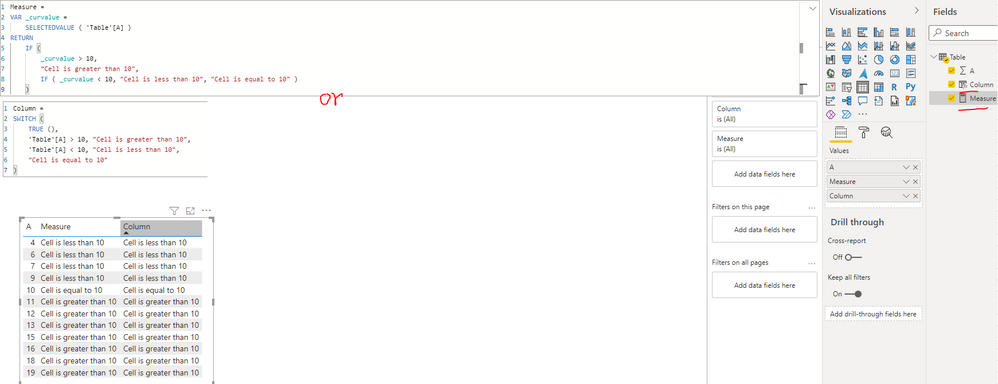
I created a sample pbix file(see attachment), please check whether that is what you want.
Create a measure or calculated column as below to get the status text:
Measure =
VAR _curvalue =
SELECTEDVALUE ( 'Table'[A] )
RETURN
IF (
_curvalue > 10,
"Cell is greater than 10",
IF ( _curvalue < 10, "Cell is less than 10", "Cell is equal to 10" )
)Column =
SWITCH (
TRUE (),
'Table'[A] > 10, "Cell is greater than 10",
'Table'[A] < 10, "Cell is less than 10",
"Cell is equal to 10"
)
Best Regards
Thank you!
@bmk with DAX measuere
Measure = switch (true(), calculate(max(fact[colA]))>10, "Cell is greater than 10","Cell is lesser than 10")
Check out the November 2025 Power BI update to learn about new features.
Advance your Data & AI career with 50 days of live learning, contests, hands-on challenges, study groups & certifications and more!
| User | Count |
|---|---|
| 58 | |
| 43 | |
| 41 | |
| 23 | |
| 17 |
| User | Count |
|---|---|
| 188 | |
| 118 | |
| 96 | |
| 64 | |
| 45 |