Forum Discussion

bmk's avatar
bmk
Icon for Helper II rankHelper II
4 years ago
Solved

Generate text based on condition like in Excel

Consider an Excel blank sheet where cell A1 = 12, and we define a condition for cell B1 =IF(A1>10,"Cell is greater than 10", "Cell is less than 10"). Result for cell B1 = Cell is greater than 10.


How do I achieve this on Power BI, in a simple table format just like in Excel, preferably multiple lines with conditions and results like the above.

3 Replies

  • Anonymous's avatar
    Anonymous
    Not applicable

    Hi bmk ,

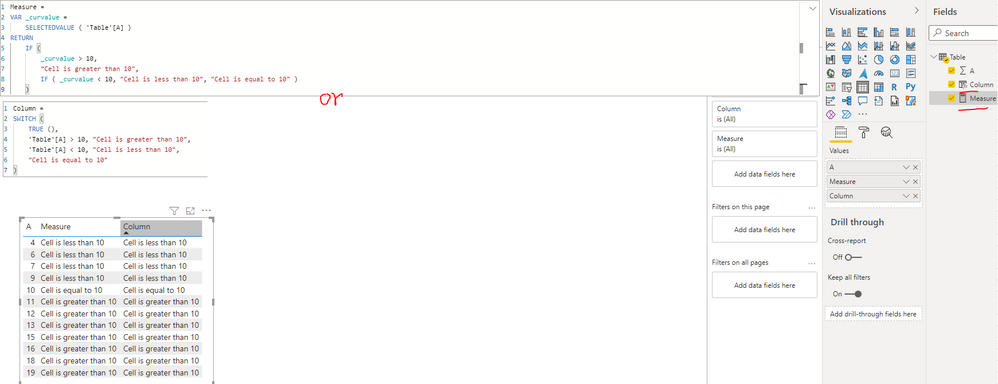
    I created a sample pbix file(see attachment), please check whether that is what you want.

    Create a measure or calculated column as below to get the status text:

    Measure = 
    VAR _curvalue =
        SELECTEDVALUE ( 'Table'[A] )
    RETURN
        IF (
            _curvalue > 10,
            "Cell is greater than 10",
            IF ( _curvalue < 10, "Cell is less than 10", "Cell is equal to 10" )
        )
    Column = 
    SWITCH (
        TRUE (),
        'Table'[A] > 10, "Cell is greater than 10",
        'Table'[A] < 10, "Cell is less than 10",
        "Cell is equal to 10"
    )

    Best Regards

    • bmk's avatar
      bmk
      Icon for Helper II rankHelper II

      Thank you!

  • smpa01's avatar
    smpa01
    Icon for Community Champion rankCommunity Champion

    bmk  with DAX measuere


    Measure = switch (true(), calculate(max(fact[colA]))>10, "Cell is greater than 10","Cell is lesser than 10")