cancel
Showing results for 
Search instead for 
Did you mean: 

Level up your Power BI skills this month - build one visual each week and tell better stories with data! Get started

Reply
hokitkan
Frequent Visitor

Generate missing data at certain time points

Hello, I'm new to power BI and now I'm facing a problem with missing data.

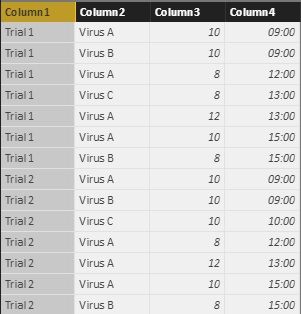
I've got a table recorded the growth rate of different kinds of virus as follow:

10.jpg


What I want to do is to create a new table and adding rows to the time point with missing data, and assuming that the growth rate remain the same as the previous reading until the next reading occurred. Like the following table:

11.jpg


I've created a new table with Unique Time point in each trial,

12.jpg

I want to know if it's possible to add missing data at corresponding time point in Power BI.

Any hints or advises would be much appreciated!

1 ACCEPTED SOLUTION
v-qiuyu-msft
Community Support
Community Support

Hi @hokitkan,


You can create a table below:


Table 2 = UNION(ADDCOLUMNS(EXCEPT(CROSSJOIN(SUMMARIZE(Table1,[Colum1],[Colum2]),VALUES('Table'[Column4])),SELECTCOLUMNS(Table1,"Colum1",[Colum1],"Colum2",[Colum2],"Column4",[Column4])),"Column3",0),SELECTCOLUMNS(Table1,"Colum1",[Colum1],"Colum2",[Colum2],"Column4",[Column4],"Column3",[Column3]))


Then create a calculated column below:


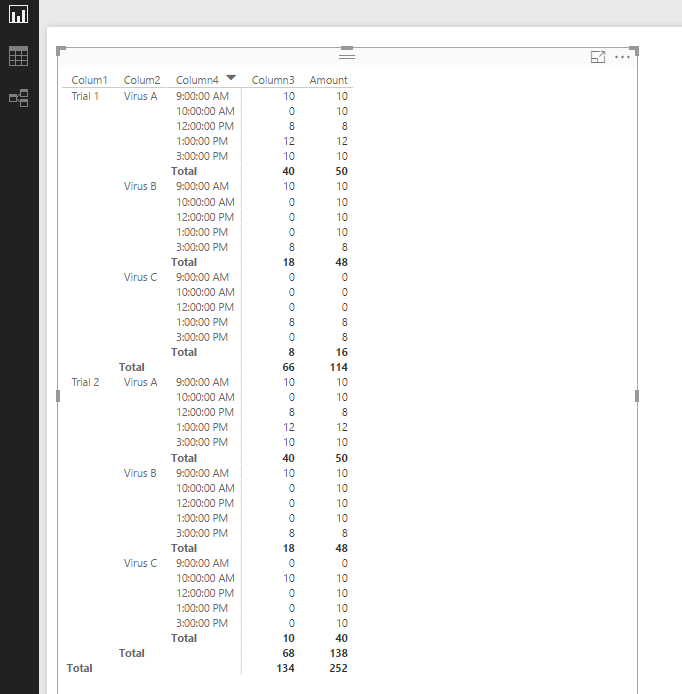
Amount = if([Column3]<>0,[Column3], MAXX(FILTER(ALL('Table 2'),[Colum1]=EARLIER([Colum1])&&[Colum2]=EARLIER('Table 2'[Colum2])&&[Column4]<EARLIER([Column4])&&[Column3]<>0),[Column3]))+0


q4.PNG


Best Regards,
Qiuyun Yu

Community Support Team _ Qiuyun Yu
If this post helps, then please consider Accept it as the solution to help the other members find it more quickly.

View solution in original post

2 REPLIES 2
v-qiuyu-msft
Community Support
Community Support

Hi @hokitkan,


You can create a table below:


Table 2 = UNION(ADDCOLUMNS(EXCEPT(CROSSJOIN(SUMMARIZE(Table1,[Colum1],[Colum2]),VALUES('Table'[Column4])),SELECTCOLUMNS(Table1,"Colum1",[Colum1],"Colum2",[Colum2],"Column4",[Column4])),"Column3",0),SELECTCOLUMNS(Table1,"Colum1",[Colum1],"Colum2",[Colum2],"Column4",[Column4],"Column3",[Column3]))


Then create a calculated column below:


Amount = if([Column3]<>0,[Column3], MAXX(FILTER(ALL('Table 2'),[Colum1]=EARLIER([Colum1])&&[Colum2]=EARLIER('Table 2'[Colum2])&&[Column4]<EARLIER([Column4])&&[Column3]<>0),[Column3]))+0


q4.PNG


Best Regards,
Qiuyun Yu

Community Support Team _ Qiuyun Yu
If this post helps, then please consider Accept it as the solution to help the other members find it more quickly.

It works perfectly! Thanks for your efforts!

Helpful resources

Announcements
April Power BI Update Carousel

Power BI Monthly Update - April 2026

Check out the April 2026 Power BI update to learn about new features.

Fabric SQL PBI Data Days

Data Days 2026 coming soon!

Sign up to receive a private message when registration opens and key events begin.

New to Fabric survey Carousel

New to Fabric Survey

If you have recently started exploring Fabric, we'd love to hear how it's going. Your feedback can help with product improvements.

Power BI DataViz World Championships carousel

Power BI DataViz World Championships - June 2026

A new Power BI DataViz World Championship is coming this June! Don't miss out on submitting your entry.

Users online (3,686)