This is best Fabric, Power BI, SQL and AI community event. How do we know? The last event sold out! Save €200 with code FABCMTY200.
Register nowA new Data Days event is coming soon! This time we’re going bigger than ever. Fabric, Power BI, SQL, AI and more. Don't miss out.
Hello, I'm new to power BI and now I'm facing a problem with missing data.
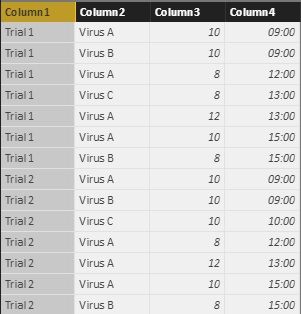
I've got a table recorded the growth rate of different kinds of virus as follow:
What I want to do is to create a new table and adding rows to the time point with missing data, and assuming that the growth rate remain the same as the previous reading until the next reading occurred. Like the following table:
I've created a new table with Unique Time point in each trial,
I want to know if it's possible to add missing data at corresponding time point in Power BI.
Any hints or advises would be much appreciated!
Solved! Go to Solution.
Hi @hokitkan,
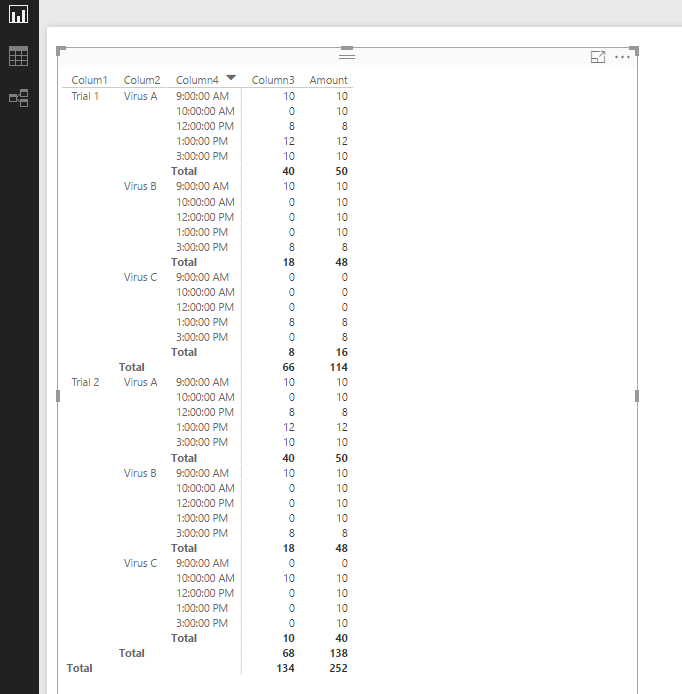
You can create a table below:
Table 2 = UNION(ADDCOLUMNS(EXCEPT(CROSSJOIN(SUMMARIZE(Table1,[Colum1],[Colum2]),VALUES('Table'[Column4])),SELECTCOLUMNS(Table1,"Colum1",[Colum1],"Colum2",[Colum2],"Column4",[Column4])),"Column3",0),SELECTCOLUMNS(Table1,"Colum1",[Colum1],"Colum2",[Colum2],"Column4",[Column4],"Column3",[Column3]))
Then create a calculated column below:
Amount = if([Column3]<>0,[Column3], MAXX(FILTER(ALL('Table 2'),[Colum1]=EARLIER([Colum1])&&[Colum2]=EARLIER('Table 2'[Colum2])&&[Column4]<EARLIER([Column4])&&[Column3]<>0),[Column3]))+0
Best Regards,
Qiuyun Yu
Hi @hokitkan,
You can create a table below:
Table 2 = UNION(ADDCOLUMNS(EXCEPT(CROSSJOIN(SUMMARIZE(Table1,[Colum1],[Colum2]),VALUES('Table'[Column4])),SELECTCOLUMNS(Table1,"Colum1",[Colum1],"Colum2",[Colum2],"Column4",[Column4])),"Column3",0),SELECTCOLUMNS(Table1,"Colum1",[Colum1],"Colum2",[Colum2],"Column4",[Column4],"Column3",[Column3]))
Then create a calculated column below:
Amount = if([Column3]<>0,[Column3], MAXX(FILTER(ALL('Table 2'),[Colum1]=EARLIER([Colum1])&&[Colum2]=EARLIER('Table 2'[Colum2])&&[Column4]<EARLIER([Column4])&&[Column3]<>0),[Column3]))+0
Best Regards,
Qiuyun Yu
It works perfectly! Thanks for your efforts!
Check out the May 2026 Power BI update to learn about new features.
Sign up to receive a private message when registration opens and key events begin.
If you have recently started exploring Fabric, we'd love to hear how it's going. Your feedback can help with product improvements.
| User | Count |
|---|---|
| 32 | |
| 25 | |
| 25 | |
| 24 | |
| 15 |
| User | Count |
|---|---|
| 61 | |
| 48 | |
| 27 | |
| 23 | |
| 20 |