cancel
Showing results for 
Search instead for 
Did you mean: 

The Power BI Data Visualization World Championships is back! Get ahead of the game and start preparing now! Learn more

Reply
Anonymous
Not applicable

Gauge in relation with other data

Morning guys,

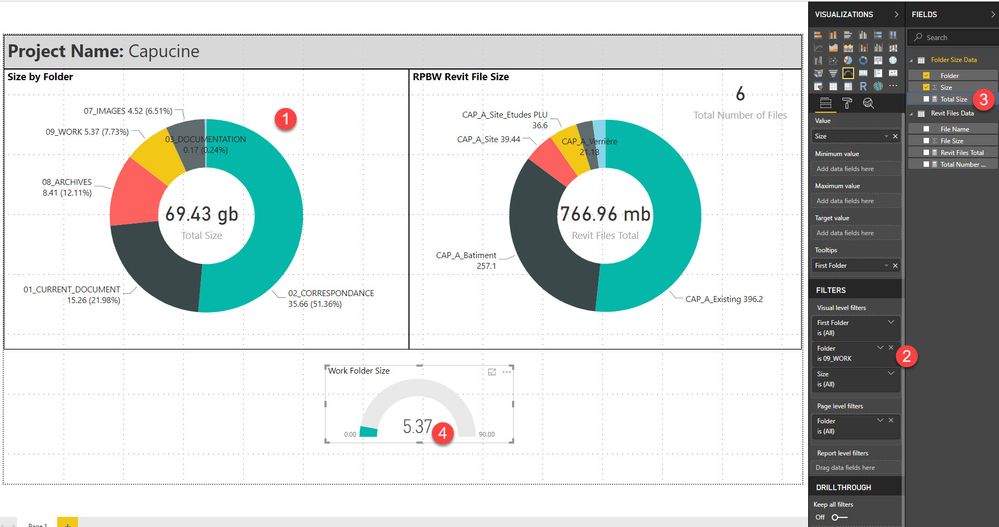
i want to create a gauge that show me the percentage of a value filtered from a series of it and i would like to link the color of the gage to the color used in another chart for the same value.


So it's a series of folder with their respective sizes. I want the gauge to show the percentage of a specific folder over the total (which is a different measure


1 : Initial visual where the folder color is set (Yellow for 09_WORK)

2 : Gauge filtered with the 09_WORK value

3 : Total size to use as the maximum value in the gauge

4 : Display a percentage


Chart.jpgT


Thanks for any help


1 ACCEPTED SOLUTION
v-danhe-msft
Microsoft Employee
Microsoft Employee

Hi @Anonymous,

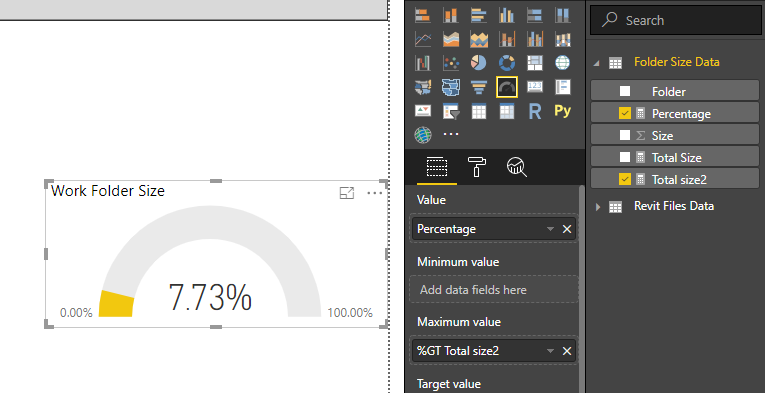
Based on test, you could refer to below measures:

Total size2 = SUM('Folder Size Data'[Size])
Percentage = CALCULATE(SUM('Folder Size Data'[Size]),FILTER('Folder Size Data','Folder Size Data'[Folder]="09_WORK"))/[Total size2]

Result:

1.PNG

You could also download the pbix file to have a view.


Regards,

Daniel He

Community Support Team _ Daniel He
If this post helps, then please consider Accept it as the solution to help the other members find it more quickly.

View solution in original post

5 REPLIES 5
v-danhe-msft
Microsoft Employee
Microsoft Employee

Hi @Anonymous,

Based on test, you could refer to below measures:

Total size2 = SUM('Folder Size Data'[Size])
Percentage = CALCULATE(SUM('Folder Size Data'[Size]),FILTER('Folder Size Data','Folder Size Data'[Folder]="09_WORK"))/[Total size2]

Result:

1.PNG

You could also download the pbix file to have a view.


Regards,

Daniel He

Community Support Team _ Daniel He
If this post helps, then please consider Accept it as the solution to help the other members find it more quickly.
Anonymous
Not applicable

This looks awesome Daniel 🙂
I'm trying to replicate, to make sure i understand but ...


I created a new measure

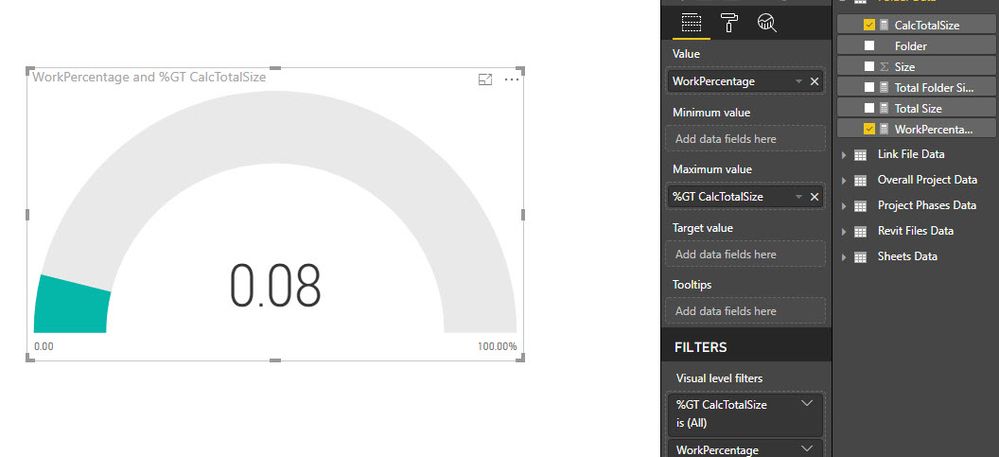
CalcTotalSize = SUM('Folder Data'[Size])
I used Calc to know i'm using it on a different measure as a calculated measure
 
Then i created this one
WorkPercentage = CALCULATE(SUM('Folder Data'[Size]),FILTER('Folder Data','Folder Data'[Folder]="09_WORK"))/[CalcTotalSize]
The data source name is slightly differnet in the one im trying to replicate
 
So i started a new Gauge and added the WorkPercentage measure as the Value.
Then added the CalcTotalSize measure as the Maximum value and set it to show as Percent of grand total.
 
Sounded about right to me but ... this is what i get. What am i missing?
00.jpg


Anonymous
Not applicable

Good morning again 🙂 I think i got the formula right but i can't get the value to display as a % When i place your value in a Card i get a percentage directly. When i place my value in one i still get a number. Any idea why?
Anonymous
Not applicable

Ok, i found what i was missing 🙂 I needed to change the Format under Modelling | Formatting to show percentage tahnks for your help
Anonymous
Not applicable

Helpful resources

Announcements
Power BI DataViz World Championships

Power BI Dataviz World Championships

The Power BI Data Visualization World Championships is back! Get ahead of the game and start preparing now!

November Power BI Update Carousel

Power BI Monthly Update - November 2025

Check out the November 2025 Power BI update to learn about new features.

FabCon Atlanta 2026 carousel

FabCon Atlanta 2026

Join us at FabCon Atlanta, March 16-20, for the ultimate Fabric, Power BI, AI and SQL community-led event. Save $200 with code FABCOMM.