cancel
Showing results for 
Search instead for 
Did you mean: 

July 7 - July 17 | Round 2 of the Power BI Dataviz World Championships. Don't miss your chance! Learn more

Reply
mohit_K
Helper I
Helper I

Gateway for Azure SQL Server

Hi All,


I am using a Azure SQL Server. And I am using a VPN while connecting to this server. Without a VPN we cannot connect to this Datasource. So, currently I refresh the Report manually on my desktop and then publish it on app.powerbi.com. 


I want to set refresh times on app.powerbi.com for my report, but that particular section is disabled.


Do I need to setup a Gateway Connection for Azure SQL Datasource(which requres a VPN to connect) OR I can connect directly ?


If I can connect directly, then please guide me how to do it.

1 ACCEPTED SOLUTION
Anonymous
Not applicable

Hi @mohit_K ,


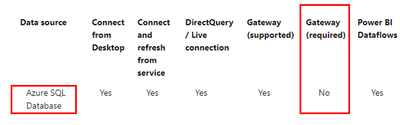
According to the official document, Gateway is not required for Azure SQL Database.

Eyelyn9_0-1648533621174.png

Eyelyn9_1-1648534051318.png


While setting up scheduled refresh for Azure SQL database, if you get an error with error code 400 when editing the credentials, try the following to set up the appropriate firewall rule:

  1. Sign in to the Azure portal.

  2. Go to the Azure SQL database for which you're configuring refresh.

  3. At the top of the Overview blade, select Set server firewall.

  4. On the Firewall settings blade, make sure that Allow Azure services and resources to access this server is set to Yes.


For more information, please refer to:

Azure SQL Database with DirectQuery - Power BI | Microsoft Docs

Azure SQL firewall settings for Power BI refresh - Dutch Data Dude


Best Regards,
Eyelyn Qin
If this post helps, then please consider Accept it as the solution to help the other members find it more quickly.


View solution in original post

2 REPLIES 2
Anonymous
Not applicable

Hi @mohit_K ,


According to the official document, Gateway is not required for Azure SQL Database.

Eyelyn9_0-1648533621174.png

Eyelyn9_1-1648534051318.png


While setting up scheduled refresh for Azure SQL database, if you get an error with error code 400 when editing the credentials, try the following to set up the appropriate firewall rule:

  1. Sign in to the Azure portal.

  2. Go to the Azure SQL database for which you're configuring refresh.

  3. At the top of the Overview blade, select Set server firewall.

  4. On the Firewall settings blade, make sure that Allow Azure services and resources to access this server is set to Yes.


For more information, please refer to:

Azure SQL Database with DirectQuery - Power BI | Microsoft Docs

Azure SQL firewall settings for Power BI refresh - Dutch Data Dude


Best Regards,
Eyelyn Qin
If this post helps, then please consider Accept it as the solution to help the other members find it more quickly.


amitchandak
Super User
Super User

@mohit_K , There Few IPs apps.powerbi.com to be whitelisted

https://docs.microsoft.com/en-us/power-bi/admin/power-bi-whitelist-urls


or use on-prem gateway

https://docs.microsoft.com/en-us/power-bi/connect-data/service-gateway-onprem

Share with Power BI Enthusiasts: Full Power BI Video (20 Hours) YouTube
Microsoft Fabric Series 60+ Videos YouTube
Microsoft Fabric Hindi End to End YouTube

Helpful resources

Announcements
FabCon and SQLCon Barcelona 2026

FabCon & SQLCon – Barcelona 2026

Join us in Barcelona for FabCon and SQLCon, the Fabric, Power BI, SQL, and AI community event. Save €200 with code FABCMTY200.

60 days of Data Days Carousel

Data Days 2026

Join Fabric Data Days 2026: 60 days of free live/on-demand sessions, challenges, study groups, and certification opportunities.

Power BI DataViz World Championships carousel

Power BI DataViz World Championships - June 2026

A new Power BI DataViz World Championship is coming this June! Don't miss out on submitting your entry.