Get certified for free when you join Fabric Data Days 2026 and dive into Fabric, Power BI, SQL, AI, and other essential data skills.
Join nowData Days is here! Join us now for 60+ days of learning, challenges, and connection. Learn more
Hello Everyone,
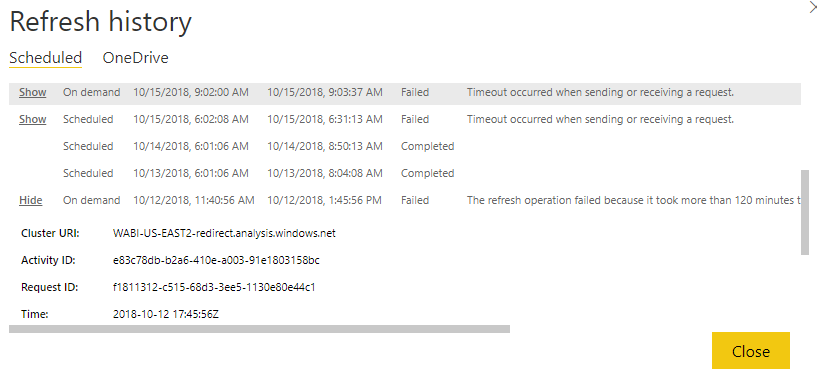
I have setup gateway to refresh daily, but somehow, I have failed to refresh due to timeout, and I have never change anything to to the file, 13 and 14 went through but not 15 and alost 12 went error due to oever 120min
Any ideas?
Solved! Go to Solution.
Hi @Anonymous
Could you refresh manually successfully?
Regarding to some similar issues, here is a workaround
1) Turn on mashup engine logs
2) Turn on verbosity level logs
3) Increase the MashupTestConnectionPoolContainerMaxInstanceCount to a larger number (say 20) in C:\Program Files\On-premises data gateway\Microsoft.PowerBI.DataMovement.Pipeline.GatewayCore.dll.config
4) Restart gateway service and turn on sql profiler (if data source is SQL server)
5) Retry the refresh on the dataset.
Please find the instructions on how to log mashup and verbose logs.
To enable verbose please follow below link:
To enable the Mashup logs for the Gateway service on the Gateway machine:
a. Stop Gateway service PBIEgwService.
b. Open the file in a text editor like notepad: C:\Program Files\On-premises data gateway\Microsoft.PowerBI.DataMovement.Pipeline.GatewayCore.dll.config
c. Search for "MashupExtendedTracing" in the file
d. Update the flag "MashupExtendedTracing" to True as the following:
<setting name="MashupExtendedTracing" serializeAs="String">
<value>True</value>
</setting>
e. Using the Gateway Configurator to enable the "Additional logging".
f. Restart the service
If the refresh still fails, collect the logs and create a support ticket here for better help.
Best Regards
Maggie
Hi @Anonymous
Could you refresh manually successfully?
Regarding to some similar issues, here is a workaround
1) Turn on mashup engine logs
2) Turn on verbosity level logs
3) Increase the MashupTestConnectionPoolContainerMaxInstanceCount to a larger number (say 20) in C:\Program Files\On-premises data gateway\Microsoft.PowerBI.DataMovement.Pipeline.GatewayCore.dll.config
4) Restart gateway service and turn on sql profiler (if data source is SQL server)
5) Retry the refresh on the dataset.
Please find the instructions on how to log mashup and verbose logs.
To enable verbose please follow below link:
To enable the Mashup logs for the Gateway service on the Gateway machine:
a. Stop Gateway service PBIEgwService.
b. Open the file in a text editor like notepad: C:\Program Files\On-premises data gateway\Microsoft.PowerBI.DataMovement.Pipeline.GatewayCore.dll.config
c. Search for "MashupExtendedTracing" in the file
d. Update the flag "MashupExtendedTracing" to True as the following:
<setting name="MashupExtendedTracing" serializeAs="String">
<value>True</value>
</setting>
e. Using the Gateway Configurator to enable the "Additional logging".
f. Restart the service
If the refresh still fails, collect the logs and create a support ticket here for better help.
Best Regards
Maggie
Don't miss out on Data Days, June 15 through August 7. Learn Fabric, Power BI, SQL, AI and more.
Check out the May 2026 Power BI update to learn about new features.
| User | Count |
|---|---|
| 23 | |
| 23 | |
| 21 | |
| 20 | |
| 15 |
| User | Count |
|---|---|
| 58 | |
| 53 | |
| 42 | |
| 30 | |
| 24 |