cancel
Showing results for 
Search instead for 
Did you mean: 

Join the FabCon + SQLCon recap series. Up next: Power BI, Real-Time Intelligence, IQ and AI, and Data Factory take center stage. All sessions are available on-demand after the live show. Register now

Reply
Anonymous
Not applicable

Gateway Issue

Hello Everyone,


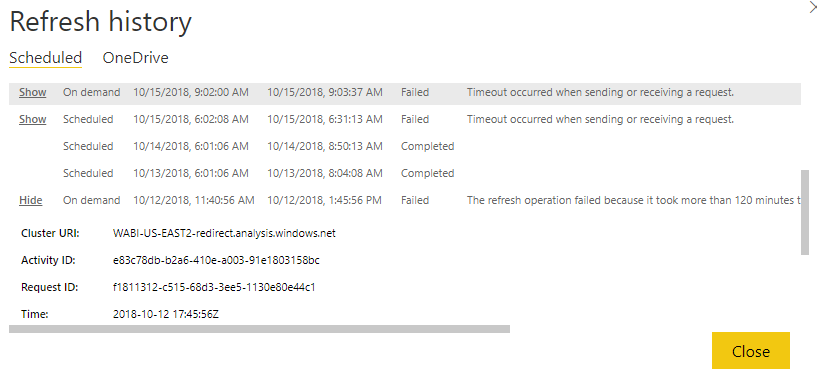
I have setup gateway to refresh daily, but somehow, I have failed to refresh due to timeout, and I have never change anything to to the file, 13 and 14 went through but not 15 and alost 12 went error due to oever 120min


Any ideas?

e.PNG


1 ACCEPTED SOLUTION
v-juanli-msft
Community Support
Community Support

Hi @Anonymous

Could you refresh manually successfully?


Regarding to some similar issues, here is a workaround

1) Turn on mashup engine logs

2) Turn on verbosity level logs

3) Increase the MashupTestConnectionPoolContainerMaxInstanceCount to a larger number (say 20) in C:\Program Files\On-premises data gateway\Microsoft.PowerBI.DataMovement.Pipeline.GatewayCore.dll.config

4) Restart gateway service and turn on sql profiler (if data source is SQL server)

5) Retry the refresh on the dataset.


Please find the instructions on how to log mashup and verbose logs.

To enable verbose please follow below link:

https://docs.microsoft.com/en-us/power-bi/service-gateway-onprem-tshoot#microsoftpowerbidatamovementpipelinediagnosticsdllconfig


To enable the Mashup logs for the Gateway service on the Gateway machine:
a. Stop Gateway service PBIEgwService.
b. Open the file in a text editor like notepad: C:\Program Files\On-premises data gateway\Microsoft.PowerBI.DataMovement.Pipeline.GatewayCore.dll.config
c. Search for "MashupExtendedTracing" in the file
d. Update the flag "MashupExtendedTracing" to True as the following:
<setting name="MashupExtendedTracing" serializeAs="String">
        <value>True</value>
</setting>
e. Using the Gateway Configurator to enable the "Additional logging".
f. Restart the service


If the refresh still fails, collect the logs and create a support ticket here for better help.


Best Regards

Maggie

View solution in original post

1 REPLY 1
v-juanli-msft
Community Support
Community Support

Hi @Anonymous

Could you refresh manually successfully?


Regarding to some similar issues, here is a workaround

1) Turn on mashup engine logs

2) Turn on verbosity level logs

3) Increase the MashupTestConnectionPoolContainerMaxInstanceCount to a larger number (say 20) in C:\Program Files\On-premises data gateway\Microsoft.PowerBI.DataMovement.Pipeline.GatewayCore.dll.config

4) Restart gateway service and turn on sql profiler (if data source is SQL server)

5) Retry the refresh on the dataset.


Please find the instructions on how to log mashup and verbose logs.

To enable verbose please follow below link:

https://docs.microsoft.com/en-us/power-bi/service-gateway-onprem-tshoot#microsoftpowerbidatamovementpipelinediagnosticsdllconfig


To enable the Mashup logs for the Gateway service on the Gateway machine:
a. Stop Gateway service PBIEgwService.
b. Open the file in a text editor like notepad: C:\Program Files\On-premises data gateway\Microsoft.PowerBI.DataMovement.Pipeline.GatewayCore.dll.config
c. Search for "MashupExtendedTracing" in the file
d. Update the flag "MashupExtendedTracing" to True as the following:
<setting name="MashupExtendedTracing" serializeAs="String">
        <value>True</value>
</setting>
e. Using the Gateway Configurator to enable the "Additional logging".
f. Restart the service


If the refresh still fails, collect the logs and create a support ticket here for better help.


Best Regards

Maggie
Helpful resources

Announcements
April Power BI Update Carousel

Power BI Monthly Update - April 2026

Check out the April 2026 Power BI update to learn about new features.

New to Fabric survey Carousel

New to Fabric Survey

If you have recently started exploring Fabric, we'd love to hear how it's going. Your feedback can help with product improvements.

Power BI DataViz World Championships carousel

Power BI DataViz World Championships - June 2026

A new Power BI DataViz World Championship is coming this June! Don't miss out on submitting your entry.

FabCon and SQLCon Highlights Carousel

FabCon &SQLCon Highlights

Experience the highlights from FabCon & SQLCon, available live and on-demand starting April 14th.