cancel
Showing results for 
Search instead for 
Did you mean: 

The Power BI Data Visualization World Championships is back! Get ahead of the game and start preparing now! Learn more

Reply
Anonymous
Not applicable

Gateway Configuration

Hi ,

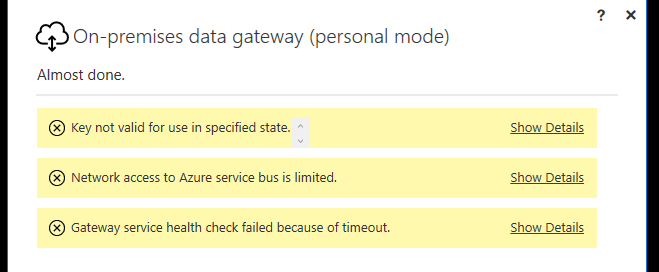
Am not able install Gateway ,getting the following error, Please help.


Capture.PNG


Regards,

Suresh.

2 ACCEPTED SOLUTIONS
v-diye-msft
Community Support
Community Support

Hi @Anonymous 


  1. The key error relates to your windows server, you can refer to this solved case which for reference : https://community.powerbi.com/t5/Power-Query/On-premises-data-gateway-personal-mode-Key-Error/td-p/218020
  2. The network limited probably happen when you didn’t configure the network correctly, the gateway creates an outbound connection to the Azure Service Bus and communicates on the following outbound ports:
  • TCP 443 (default)
  • 5671
  • 5672
  • 9350 thru 9354

It is recommended that you add the IP addresses to an allow list, for your data region, in your firewall. You can download list of IP addresses, which are found in the Microsoft Azure Datacenter IP list. The gateway will communicate with Azure Service Bus using the specified IP address, along with the fully qualified domain name (FQDN). If you're forcing the gateway to communicate using HTTPS, the gateway strictly uses FQDN only, and no communication will occur using IP addresses.

  1. This error might occur because you have a web proxy which only allows port : 80 and port 443 to communicate with web. The reason for this issue this it only uses http communication whereas the gateway uses direct TCP connect to communicate to your server with Azure service bus.

Here’s blog for your reference: https://nisalbi.blogspot.com/2017/09/power-bi-on-premises-data-gateway-error.html


Also, we’d suggest you to refer to the official documents for more details:

https://docs.microsoft.com/en-us/power-bi/service-gateway-deployment-guidance


More error details preferred if the issue still exist.


Best regards,

Dina Ye

Community Support Team _ Dina Ye
If this post helps, then please consider Accept it as the solution to help the other members find it more
quickly.

View solution in original post

Hi @Anonymous ,


If my above post helps, could you please consider Accept it as the solution to help the other members find it more quickly. thanks!


Best regards,

Dina Ye

Community Support Team _ Dina Ye
If this post helps, then please consider Accept it as the solution to help the other members find it more
quickly.

View solution in original post

2 REPLIES 2
v-diye-msft
Community Support
Community Support

Hi @Anonymous 


  1. The key error relates to your windows server, you can refer to this solved case which for reference : https://community.powerbi.com/t5/Power-Query/On-premises-data-gateway-personal-mode-Key-Error/td-p/218020
  2. The network limited probably happen when you didn’t configure the network correctly, the gateway creates an outbound connection to the Azure Service Bus and communicates on the following outbound ports:
  • TCP 443 (default)
  • 5671
  • 5672
  • 9350 thru 9354

It is recommended that you add the IP addresses to an allow list, for your data region, in your firewall. You can download list of IP addresses, which are found in the Microsoft Azure Datacenter IP list. The gateway will communicate with Azure Service Bus using the specified IP address, along with the fully qualified domain name (FQDN). If you're forcing the gateway to communicate using HTTPS, the gateway strictly uses FQDN only, and no communication will occur using IP addresses.

  1. This error might occur because you have a web proxy which only allows port : 80 and port 443 to communicate with web. The reason for this issue this it only uses http communication whereas the gateway uses direct TCP connect to communicate to your server with Azure service bus.

Here’s blog for your reference: https://nisalbi.blogspot.com/2017/09/power-bi-on-premises-data-gateway-error.html


Also, we’d suggest you to refer to the official documents for more details:

https://docs.microsoft.com/en-us/power-bi/service-gateway-deployment-guidance


More error details preferred if the issue still exist.


Best regards,

Dina Ye

Community Support Team _ Dina Ye
If this post helps, then please consider Accept it as the solution to help the other members find it more
quickly.

Hi @Anonymous ,


If my above post helps, could you please consider Accept it as the solution to help the other members find it more quickly. thanks!


Best regards,

Dina Ye

Community Support Team _ Dina Ye
If this post helps, then please consider Accept it as the solution to help the other members find it more
quickly.

Helpful resources

Announcements
Power BI DataViz World Championships

Power BI Dataviz World Championships

The Power BI Data Visualization World Championships is back! Get ahead of the game and start preparing now!

December 2025 Power BI Update Carousel

Power BI Monthly Update - December 2025

Check out the December 2025 Power BI Holiday Recap!

FabCon Atlanta 2026 carousel

FabCon Atlanta 2026

Join us at FabCon Atlanta, March 16-20, for the ultimate Fabric, Power BI, AI and SQL community-led event. Save $200 with code FABCOMM.