Don't miss your chance to take the Fabric Data Engineer (DP-600) exam for FREE! Find out how by watching the DP-600 session on-demand now through April 28th.
Learn moreJoin the FabCon + SQLCon recap series. Up next: Power BI, Real-Time Intelligence, IQ and AI, and Data Factory take center stage. All sessions are available on-demand after the live show. Register now
HI,
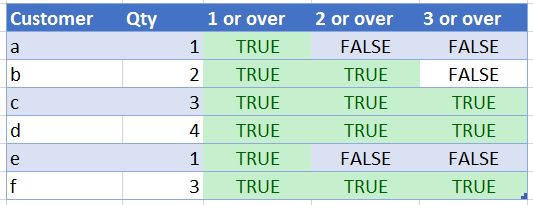
I am trying to create a funnel chart of following items. I managed to do it in couple of ways I am still unable to filter other visuals with my funnel chart.
So what would be the best way to make funnel chart out of this? Am I on the right track if I unpivot the values in query editor and use that new column created for making the funne graphl? Didn't want to go further with this before someone tells me it is the reasonable way to go?
Jenny
Hey Jenny, not sure if you ever got an answer to this!
I had a similar issue and ended up unvpivoting the values and using the attributes as my group. Based on my research, this is the best way to build a funnel chart with overlapping groups.
Hi srasch10,
Can you explain how were you able to use the attributes as the group, have unpivoted the data but finding it difficult to use this information to build the funnel.
Hi dhannaa,
What visual do you want to filter by using this funnel chart? Could you share more details about your requirement?
Regards,
Jimmy Tao
Hi,
I would like to filter other visuals in the report by clicking the areas in this funnel cart (just the basic filtering in the reports).
At first I made the funnel with measures that I put to the values -section. That didn't filter the other graphs at all. After some more experiments, I made the funnel chart by unpivoting the fields mentioned in my earlier message. That worked and funnel filters the other visuals as wanted.
Now I am facing some extra problems with that though, so I wanted to ask if there is some better way to create funnel in this situation - when the goups are overlapping/values belong to more than one section in the funnel.
Hard to explain, don't hesitate to ask for more explanations!
Jenny
Check out the April 2026 Power BI update to learn about new features.
If you have recently started exploring Fabric, we'd love to hear how it's going. Your feedback can help with product improvements.
A new Power BI DataViz World Championship is coming this June! Don't miss out on submitting your entry.
| User | Count |
|---|---|
| 42 | |
| 37 | |
| 34 | |
| 21 | |
| 16 |
| User | Count |
|---|---|
| 65 | |
| 62 | |
| 31 | |
| 26 | |
| 25 |