cancel
Showing results for 
Search instead for 
Did you mean: 

Next up in the FabCon + SQLCon recap series: The roadmap for Microsoft SQL and Maximizing Developer experiences in Fabric. All sessions are available on-demand after the live show. Register now

Reply
Anonymous
Not applicable

Functions and Parameters in Add Custom Column

Hi All,


Um not aware of DAX and want to create custom columns in query editor.

non of the functions are working in the expression except control flow statements (IF) or any arithmetic operators(+,-,*,/).


1. can we not use functions like  datatype conversions/date/...??

2. do we have anyway to get, if we want values based on a parameter( variables which we select on the report page by hitting on a filter visualization) in the custom column like:


CASE WHEN [AccNo] in ('') and

                     [Year] = @parameter (or variable)

          THEN Measure

ELSE (0)

END..


4 REPLIES 4
v-sihou-msft
Microsoft Employee
Microsoft Employee

@Anonymous


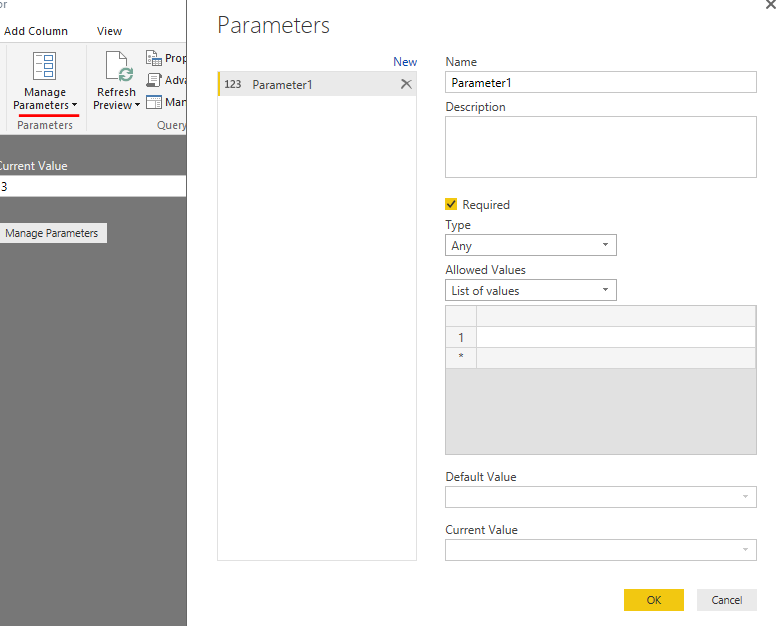
In Power BI Desktop April or later version, you can create Query Parameter in Query Editor. You can specify "Any Value" or "List of value" for input or selection. 

Capture003.PNG

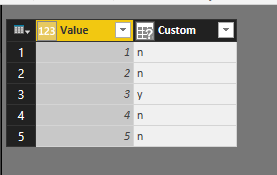
Then you can use this parameter in your custom column as condition.

Capture004.PNG

Capture005.PNG

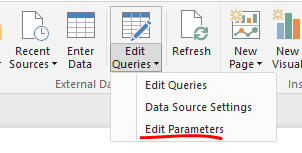
To edit the parameter when filtering data, you can just go to "Edit Queries" ->"Edit Parameter".

Capture006.PNG

For more information, please see: https://powerbi.microsoft.com/en-us/blog/deep-dive-into-query-parameters-and-power-bi-templates/ 

Anonymous
Not applicable

The query editor does not use DAX. It uses the Power Query language, also known as M. Data type conversions can be done for an entire column using the buttons in the ribbon, or you can use specific type conversion functions within a custom column formula.


Here's the reference site for M functions.


Here is the reference site for the language itself.


M is case sensitive. The generic syntax for an if statement is:


if [Column Name] = "condition" then "result" else "alternative result"


I'm not sure what you're asking for with selections on a report page. Measures on a report don't interact with the query. The query executes when your dataset refreshes, not when the user makes a selection on a slicer. If your dataset uses Direct Query, I believe the report will send a new query when you change a selection, but as I understand it the query is defined by the visual and its components, not by anything done in the query editor.


Anonymous
Not applicable

can u please help me out with this...??

how can i write following in M query cus its not suppose to take in operator there:

if [AccountNumber] in ("1","2",""......"n") and another condition
then ([Rate] * [Revenue] )
else 0


apart from giving one condition for every account number with OR operato.

do we have any equivalance for 'IN' operator in Power Query..???

Anonymous
Not applicable

To compare a value against a list of values, use the List.ContainsAny function. This function actually compares two lists, but for your purposes just think of each row of the column as a list that only contains a single item.


if List.Contains( {[AccountNumber]}, {1, 2, 3} ) and [OtherColumn] = "other condition" then ([Rate] * [Revenue]) else 0

Helpful resources

Announcements
April Power BI Update Carousel

Power BI Monthly Update - April 2026

Check out the April 2026 Power BI update to learn about new features.

New to Fabric survey Carousel

New to Fabric Survey

If you have recently started exploring Fabric, we'd love to hear how it's going. Your feedback can help with product improvements.

Power BI DataViz World Championships carousel

Power BI DataViz World Championships - June 2026

A new Power BI DataViz World Championship is coming this June! Don't miss out on submitting your entry.

FabCon and SQLCon Highlights Carousel

FabCon &SQLCon Highlights

Experience the highlights from FabCon & SQLCon, available live and on-demand starting April 14th.