Join us at FabCon Atlanta from March 16 - 20, 2026, for the ultimate Fabric, Power BI, AI and SQL community-led event. Save $200 with code FABCOMM.
Register now!The Power BI Data Visualization World Championships is back! Get ahead of the game and start preparing now! Learn more
Hi guys,
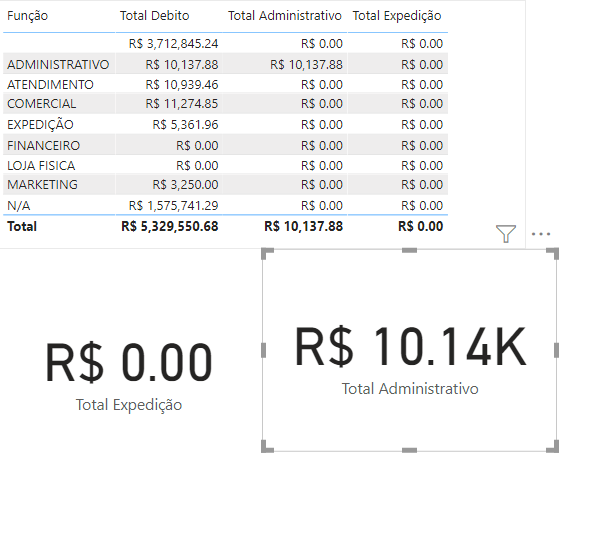
Does anyone know how to tell me what might be contausing the following situation?
I created some functions to display the total values by category on the card.
Solved! Go to Solution.
Your code looks fine, try making sure relationship between your dimension and fact table is active and correct, ensure Expedição exissit in your fact table. . Also ensure spelling is correct of Expedição you are trying to use. I can see you created a measure for Total Administit.. maybe copy that code and replace with Expedição.
You can also try using Keepfilter instead of Filter function.
Your code looks fine, try making sure relationship between your dimension and fact table is active and correct, ensure Expedição exissit in your fact table. . Also ensure spelling is correct of Expedição you are trying to use. I can see you created a measure for Total Administit.. maybe copy that code and replace with Expedição.
You can also try using Keepfilter instead of Filter function.
I checked and there really was an inconcistence in the relationship. Thank you so much @QQCFA
The Power BI Data Visualization World Championships is back! Get ahead of the game and start preparing now!
| User | Count |
|---|---|
| 38 | |
| 36 | |
| 33 | |
| 33 | |
| 29 |
| User | Count |
|---|---|
| 132 | |
| 86 | |
| 85 | |
| 68 | |
| 64 |