Get certified for free when you join Fabric Data Days 2026 and dive into Fabric, Power BI, SQL, AI, and other essential data skills.
Join nowTry your skills in the Power BI Dataviz World Championship! Round one ends June 26. Join now
Hello, can anybody help me? I dont even know where to start 😞
Situation:
thats not the real table because i cant share the information, but is something like this:
| Costumer | Product | Date |
| Costumer 1 | Product x | 01/10/2021 |
| Costumer 2 | Product x | 01/10/2021 |
| Costumer 1 | Product x | 01/10/2021 |
| Costumer 1 | Product x | 01/09/2021 |
| Costumer 1 | Product x | 01/08/2021 |
| Costumer 2 | Product x | 10/10/2021 |
| Costumer 3 | Product x | 05/09/2021 |
| Costumer 3 | Product x | 10/08/2021 |
| Costumer 3 | Product x | 07/07/2021 |
| Costumer 3 | Product x | 01/11/2021 |
and the output would be:
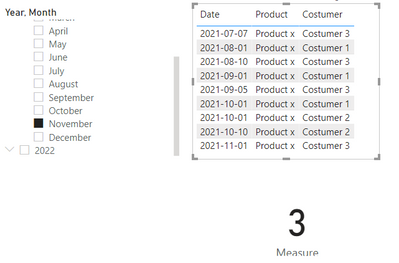
When i select a month the card visualization will show how many costumers purchased at 3 differents months in the last 5 months (if i select july for example it will be the 5 months before july)
For example (for this data table):
If i select november, the measure will return 2 costumers, because between november and june 2 costumers purchased in 3 differents months.
Thank you very much!!
PS: sorry for my english, i'm brazilian
Solved! Go to Solution.
Hi @Anonymous
try this measure,
Measure =
var _date=DATE(MAX('Calendar'[Date].[Year]),MAX('Calendar'[Date].[MonthNo]),1)
var _start=EOMONTH(_date,-5)
var _end=EOMONTH(_date,0)
return IF(ISFILTERED('Calendar'[Date].[Month]),CALCULATE(DISTINCTCOUNT('Table'[Costumer]),FILTER(ALL('Table'),'Table'[Date]<=_end&&'Table'[Date]>_start)),BLANK())
result
Best Regards,
Community Support Team _Tang
If this post helps, please consider Accept it as the solution to help the other members find it more quickly.
Hi @Anonymous
try this measure,
Measure =
var _date=DATE(MAX('Calendar'[Date].[Year]),MAX('Calendar'[Date].[MonthNo]),1)
var _start=EOMONTH(_date,-5)
var _end=EOMONTH(_date,0)
return IF(ISFILTERED('Calendar'[Date].[Month]),CALCULATE(DISTINCTCOUNT('Table'[Costumer]),FILTER(ALL('Table'),'Table'[Date]<=_end&&'Table'[Date]>_start)),BLANK())
result
Best Regards,
Community Support Team _Tang
If this post helps, please consider Accept it as the solution to help the other members find it more quickly.
@Anonymous , Use date tbale, join with date. Add month year column in table
New column
Month year = format([Date], "YYYYMM")
Measures
Rolling 5= CALCULATE(DistinctCount('Table'[Month Year]),DATESINPERIOD('Date'[Date ],MAX('Date'[Date ]),-5,MONTH))
Min 3 Months = countx(filter(values(Table[Customer]), [Rolling 5] >=3), [Customer])
| User | Count |
|---|---|
| 23 | |
| 21 | |
| 20 | |
| 20 | |
| 11 |
| User | Count |
|---|---|
| 62 | |
| 55 | |
| 47 | |
| 44 | |
| 37 |