cancel
Showing results for 
Search instead for 
Did you mean: 

Data Days is here! Join us now for 60+ days of learning, challenges, and connection. Learn more

Reply
Anonymous
Not applicable

Formula help

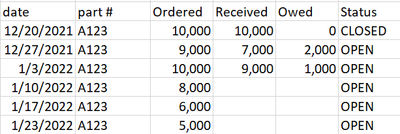
Hi. I am new to power bi and would like to see if anyone is able to help me with figuring out a formula for a situation. Here is a example I just typed up in excel for this. If I wanted to create a formula that adds up how much is due this week (1/10 ordered column 8,000) plus what is remaining from previous weeks is there a formula that can do this? And if the Status column shows CLOSED that means nothing is due and the order is complete so is there a way for the formula to only look at OPEN columns? Thanks!

bossyr94_0-1641840890618.png


1 ACCEPTED SOLUTION
amitchandak
Super User
Super User

@Anonymous , Try the preferably using date table and use date from date table in visual


Calculate(sum(Table[ordered]) - Sum(Table[received]) , filter(all('Date'), 'Date'[Date] <= max('Date'[Date]) ),

filter(Table, Table[Status] <> "CLOSED") )


Why Time Intelligence Fails - Powerbi 5 Savior Steps for TI :https://youtu.be/OBf0rjpp5Hw
https://amitchandak.medium.com/power-bi-5-key-points-to-make-time-intelligence-successful-bd52912a5b...
To get the best of the time intelligence function. Make sure you have a date calendar and it has been marked as the date in model view. Also, join it with the date column of your fact/s. Refer :radacad sqlbi My Video Series Appreciate your Kudos.

Share with Power BI Enthusiasts: Full Power BI Video (20 Hours) YouTube
Microsoft Fabric Series 60+ Videos YouTube
Microsoft Fabric Hindi End to End YouTube

View solution in original post

3 REPLIES 3
v-zhangti
Community Support
Community Support

Hi, @Anonymous 


If you want to see the data as of today, you can use Today().

Measure =
CALCULATE (
    SUM ( 'Table'[Ordered] ) - SUM ( 'Table'[Received] ),
    FILTER (
        ALL ( 'Table' ),
        'Table'[Date] <= TODAY ()
            && 'Table'[Status] <> "CLOSED"
    )
)

vzhangti_0-1642060703923.png

Is this the result you expect?


Best Regards,

Community Support Team _Charlotte

If this post helps, then please consider Accept it as the solution to help the other members find it more quickly.

amitchandak
Super User
Super User

@Anonymous , Try the preferably using date table and use date from date table in visual


Calculate(sum(Table[ordered]) - Sum(Table[received]) , filter(all('Date'), 'Date'[Date] <= max('Date'[Date]) ),

filter(Table, Table[Status] <> "CLOSED") )


Why Time Intelligence Fails - Powerbi 5 Savior Steps for TI :https://youtu.be/OBf0rjpp5Hw
https://amitchandak.medium.com/power-bi-5-key-points-to-make-time-intelligence-successful-bd52912a5b...
To get the best of the time intelligence function. Make sure you have a date calendar and it has been marked as the date in model view. Also, join it with the date column of your fact/s. Refer :radacad sqlbi My Video Series Appreciate your Kudos.

Share with Power BI Enthusiasts: Full Power BI Video (20 Hours) YouTube
Microsoft Fabric Series 60+ Videos YouTube
Microsoft Fabric Hindi End to End YouTube
Anonymous
Not applicable

Thank you! i will try it out!

Helpful resources

Announcements
Fabric Data Days is here Carousel

Fabric Data Days 2026

Don't miss out on Data Days, June 15 through August 7. Learn Fabric, Power BI, SQL, AI and more.

May Power BI Update Carousel

Power BI Monthly Update - May 2026

Check out the May 2026 Power BI update to learn about new features.

Power BI DataViz World Championships carousel

Power BI DataViz World Championships - June 2026

A new Power BI DataViz World Championship is coming this June! Don't miss out on submitting your entry.