cancel
Showing results for 
Search instead for 
Did you mean: 

Get Fabric Certified for FREE during AI Skills Fest. This week only. Secure your voucher now.

Reply
Anonymous
Not applicable

Formula help

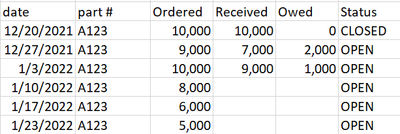
Hi. I am new to power bi and would like to see if anyone is able to help me with figuring out a formula for a situation. Here is a example I just typed up in excel for this. If I wanted to create a formula that adds up how much is due this week (1/10 ordered column 8,000) plus what is remaining from previous weeks is there a formula that can do this? And if the Status column shows CLOSED that means nothing is due and the order is complete so is there a way for the formula to only look at OPEN columns? Thanks!

bossyr94_0-1641840890618.png


1 ACCEPTED SOLUTION
amitchandak
Super User
Super User

@Anonymous , Try the preferably using date table and use date from date table in visual


Calculate(sum(Table[ordered]) - Sum(Table[received]) , filter(all('Date'), 'Date'[Date] <= max('Date'[Date]) ),

filter(Table, Table[Status] <> "CLOSED") )


Why Time Intelligence Fails - Powerbi 5 Savior Steps for TI :https://youtu.be/OBf0rjpp5Hw
https://amitchandak.medium.com/power-bi-5-key-points-to-make-time-intelligence-successful-bd52912a5b...
To get the best of the time intelligence function. Make sure you have a date calendar and it has been marked as the date in model view. Also, join it with the date column of your fact/s. Refer :radacad sqlbi My Video Series Appreciate your Kudos.

Share with Power BI Enthusiasts: Full Power BI Video (20 Hours) YouTube
Microsoft Fabric Series 60+ Videos YouTube
Microsoft Fabric Hindi End to End YouTube

View solution in original post

3 REPLIES 3
v-zhangti
Community Support
Community Support

Hi, @Anonymous 


If you want to see the data as of today, you can use Today().

Measure =
CALCULATE (
    SUM ( 'Table'[Ordered] ) - SUM ( 'Table'[Received] ),
    FILTER (
        ALL ( 'Table' ),
        'Table'[Date] <= TODAY ()
            && 'Table'[Status] <> "CLOSED"
    )
)

vzhangti_0-1642060703923.png

Is this the result you expect?


Best Regards,

Community Support Team _Charlotte

If this post helps, then please consider Accept it as the solution to help the other members find it more quickly.

amitchandak
Super User
Super User

@Anonymous , Try the preferably using date table and use date from date table in visual


Calculate(sum(Table[ordered]) - Sum(Table[received]) , filter(all('Date'), 'Date'[Date] <= max('Date'[Date]) ),

filter(Table, Table[Status] <> "CLOSED") )


Why Time Intelligence Fails - Powerbi 5 Savior Steps for TI :https://youtu.be/OBf0rjpp5Hw
https://amitchandak.medium.com/power-bi-5-key-points-to-make-time-intelligence-successful-bd52912a5b...
To get the best of the time intelligence function. Make sure you have a date calendar and it has been marked as the date in model view. Also, join it with the date column of your fact/s. Refer :radacad sqlbi My Video Series Appreciate your Kudos.

Share with Power BI Enthusiasts: Full Power BI Video (20 Hours) YouTube
Microsoft Fabric Series 60+ Videos YouTube
Microsoft Fabric Hindi End to End YouTube
Anonymous
Not applicable

Thank you! i will try it out!

Helpful resources

Announcements
May Power BI Update Carousel

Power BI Monthly Update - May 2026

Check out the May 2026 Power BI update to learn about new features.

Fabric SQL PBI Data Days

Data Days 2026 coming soon!

Sign up to receive a private message when registration opens and key events begin.

Power BI DataViz World Championships carousel

Power BI DataViz World Championships - June 2026

A new Power BI DataViz World Championship is coming this June! Don't miss out on submitting your entry.