Join us at FabCon Atlanta from March 16 - 20, 2026, for the ultimate Fabric, Power BI, AI and SQL community-led event. Save $200 with code FABCOMM.
Register now!Get Fabric Certified for FREE during Fabric Data Days. Don't miss your chance! Request now
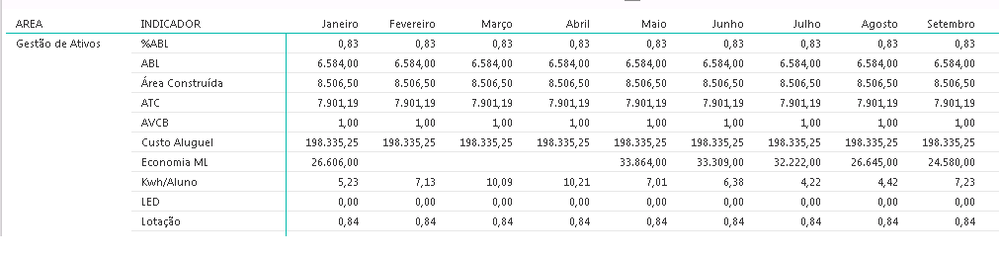
Friends, have some way to put in the array (print) each line with a type of formatting. Example in print.
In the% ABL line would have to be in percentage.
On the ATC Line it would have to appear in decimal
In the LED Line if it is 1 then it changes "yes", 0 changes to "no"
Do you know if it's possible?
Thank you so much!
Solved! Go to Solution.
Hi @walnei,
You can create a measure to contain logic that determine if the INDICATOR equals to a specific value and then format the Values field. Below is an example for your reference.
Measure = IF(LASTNONBLANK(Table1[INDICADOR],"")="%ABL",FORMAT(SUM(Table1[columnvalue]),"PERCENT"),IF(LASTNONBLANK(Table1[INDICADOR],"")="ACT",FORMAT(SUM(Table1[columnvalue]),"Fixed"),IF(AND(LASTNONBLANK(Table1[INDICADOR],"")="LED",LASTNONBLANK(Table1[columnvalue],"")=1),"Yes","No")))
However, the values you format will be defined as text type in Matrix visual, and it doesn’t make sense. From my point of view, it is better to change the format of the values in your original tables.
Thanks,
Lydia Zhang
Hi @walnei,
You can create a measure to contain logic that determine if the INDICATOR equals to a specific value and then format the Values field. Below is an example for your reference.
Measure = IF(LASTNONBLANK(Table1[INDICADOR],"")="%ABL",FORMAT(SUM(Table1[columnvalue]),"PERCENT"),IF(LASTNONBLANK(Table1[INDICADOR],"")="ACT",FORMAT(SUM(Table1[columnvalue]),"Fixed"),IF(AND(LASTNONBLANK(Table1[INDICADOR],"")="LED",LASTNONBLANK(Table1[columnvalue],"")=1),"Yes","No")))
However, the values you format will be defined as text type in Matrix visual, and it doesn’t make sense. From my point of view, it is better to change the format of the values in your original tables.
Thanks,
Lydia Zhang
@Anonymous
One more question.How to do to put as a thousand, putting a point. Example. 5154,56 to 5.154
Tks
Spectacular, thank you ... You saved me! Hug!!!!
Check out the November 2025 Power BI update to learn about new features.
Advance your Data & AI career with 50 days of live learning, contests, hands-on challenges, study groups & certifications and more!