cancel
Showing results for 
Search instead for 
Did you mean: 

We've captured the moments from FabCon & SQLCon that everyone is talking about, and we are bringing them to the community, live and on-demand. Starts on April 14th. Register now

Reply
chengja1
New Member

Formatting matrix rows

Hello,


I'd like to format a matrix table better for my business requirements:


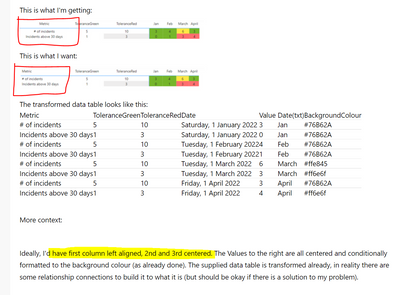
This is what I'm getting:

chengja1_0-1656624536149.png

This is what I want:

chengja1_0-1656627237955.png

The transformed data table looks like this:

MetricToleranceGreenToleranceRedDateValueDate(txt)BackgroundColour
# of incidents510Saturday, 1 January 20223Jan#76B62A
Incidents above 30 days13Saturday, 1 January 20220Jan#76B62A
# of incidents510Tuesday, 1 February 20224Feb#76B62A
Incidents above 30 days13Tuesday, 1 February 20221Feb#76B62A
# of incidents510Tuesday, 1 March 20226March#ffe845
Incidents above 30 days13Tuesday, 1 March 20223March#ff6e6f
# of incidents510Friday, 1 April 20223April#76B62A
Incidents above 30 days13Friday, 1 April 20224April#ff6e6f


More context:


Ideally, I'd have first column left aligned, 2nd and 3rd centered. The Values to the right are all centered and conditionally formatted to the background colour (as already done). The supplied data table is transformed already, in reality there are some relationship connections to build it to what it is (but should be okay if there is a solution to my problem).


I've tried googling to no avail, but if there is an existing solution, please link for me.


Cheers,
Jason 

EDIT:
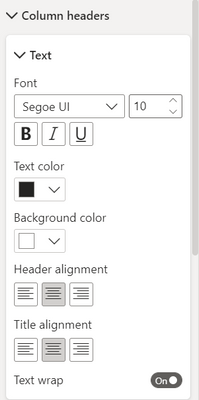
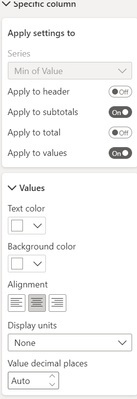
FYI, my current settings:

chengja1_0-1656627977319.pngchengja1_1-1656628049118.pngchengja1_2-1656628078863.pngchengja1_3-1656628109619.pngchengja1_4-1656628132823.pngchengja1_5-1656628148622.png


4 REPLIES 4
Anonymous
Not applicable

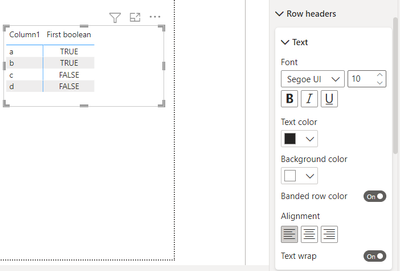
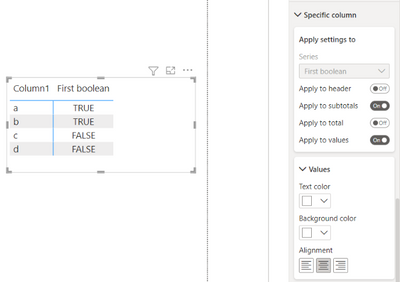
@chengja1  you can put, row headers alignement : left, and specific column alignement : center.

like this : 

AtefehNakisa_0-1656937716987.png

and

AtefehNakisa_1-1656937775000.png

I hope this, answer the question.

Hi, thank you for your answer.


Sorry this does not solve my problem. What you've shown me here where you apply the formatting of the Row headers, and specific columns does not align to my data structure.

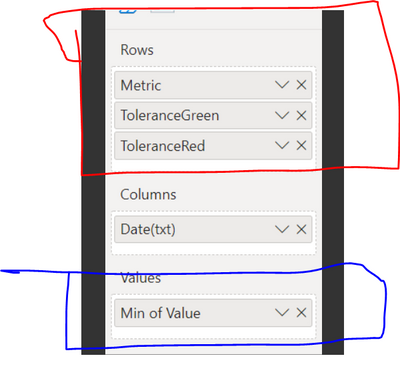
What is circled in yellow is the row headers, in your snippet and in mine, shows that it's a global formatting for all the rows. But what I want is for "Metric" to be left aligned, "ToleranceGreen" to be centered, "ToleranceRed" to be centered.


The specific columns that you took a snippet of, is what is circled in blue in my picture - and is not relevant to the problem I am having.

chengja1_0-1656972228030.png


Hope this makes sense, and can help you answer my question

chengja1
New Member

Hello,


That does not answer my question.


I am specifically looking for a method to left align the first matrix column in the table and keep the 2nd and 3rd column centered.

 Please see the circled and highlighted bits of relevant information that may help you to guide you to assisting me.

chengja1_0-1656902542783.png


Anonymous
Not applicable

@chengja1  Hello, please check this link, 

https://youtu.be/fOErC7eaWZ0

 I hope this answer your question.

Helpful resources

Announcements
New to Fabric survey Carousel

New to Fabric Survey

If you have recently started exploring Fabric, we'd love to hear how it's going. Your feedback can help with product improvements.

Power BI DataViz World Championships carousel

Power BI DataViz World Championships - June 2026

A new Power BI DataViz World Championship is coming this June! Don't miss out on submitting your entry.

Join our Fabric User Panel

Join our Fabric User Panel

Share feedback directly with Fabric product managers, participate in targeted research studies and influence the Fabric roadmap.

March Power BI Update Carousel

Power BI Community Update - March 2026

Check out the March 2026 Power BI update to learn about new features.