cancel
Showing results for 
Search instead for 
Did you mean: 

Learn from the best! Meet the four finalists headed to the FINALS of the Power BI Dataviz World Championships! Register now

Reply
asbpowerbi
Helper IV
Helper IV

Formatting columns -table visualization - data dictionary

Hello All,


I would like your advice. My company uses a lot of acronyms for field names in our tables. Currently in my reports, I have to go in and change the name of the field, from our acronym - to a word or phrase that would make sense to our customers. I have to do this for every field I display. There has to be a better way. What ways do you apply a 'customer facing' column name/definition to a lot of columns with accronyms for names?


Cheers!


Peter

1 ACCEPTED SOLUTION
Anonymous
Not applicable

Hi @asbpowerbi ,


I understand what you mean but unfortunately there is no direct way to create such tooltips, this is due to the design of Power BI Desktop, you can provide your ideas in the Idea forum.
You can refer to the following thread for a solution to create measures to design tooltips as an alternative.

Solved: Change tooltip message based on measure being hove... - Microsoft Fabric Community


Best Regards,

Neeko Tang

If this post  helps, then please consider Accept it as the solution  to help the other members find it more quickly. 

View solution in original post

3 REPLIES 3
Anonymous
Not applicable

Hi @asbpowerbi ,


1.To rename a column in Power BI, simply navigate to the Fields pane, right-click on the column you wish to rename, and select Rename. Enter the customer-facing name you'd like to use. This change will only affect the report view and not the underlying dataset.

Power BI Desktop does not support batch alias modification for the time being, you can modify them one by one.


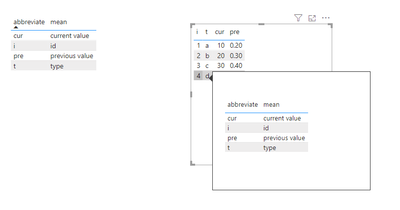
2.If your reports require extensive use of acronyms and technical terms, consider creating a data dictionary within Power BI. This can be a separate table or report page that defines each term or acronym used in your reports.

You can create a new table in Power BI using the Enter Data option, where you list all acronyms in one column and their definitions in another. This table can then be used as a reference within your report or shared with your report users.


3.Another approach is to use tooltips.To add a tooltip, select a visual and then go to the Format pane. Under the Tooltip section, you can customize the content that appears.

vtangjiemsft_0-1711607854397.png

Best Regards,

Neeko Tang

If this post  helps, then please consider Accept it as the solution  to help the other members find it more quickly. 

Hello,


  Thank you for the reply! is there a way to pull the tool tip description, based on the table and column that is being used? that looks like the best solution for me.


Cheers!


Peter

Anonymous
Not applicable

Hi @asbpowerbi ,


I understand what you mean but unfortunately there is no direct way to create such tooltips, this is due to the design of Power BI Desktop, you can provide your ideas in the Idea forum.
You can refer to the following thread for a solution to create measures to design tooltips as an alternative.

Solved: Change tooltip message based on measure being hove... - Microsoft Fabric Community


Best Regards,

Neeko Tang

If this post  helps, then please consider Accept it as the solution  to help the other members find it more quickly. 

Helpful resources

Announcements
Join our Fabric User Panel

Join our Fabric User Panel

Share feedback directly with Fabric product managers, participate in targeted research studies and influence the Fabric roadmap.

March Power BI Update Carousel

Power BI Community Update - March 2026

Check out the March 2026 Power BI update to learn about new features.