cancel
Showing results for 
Search instead for 
Did you mean: 

Learn from the best! Meet the four finalists headed to the FINALS of the Power BI Dataviz World Championships! Register now

Reply
nxa03tm
Regular Visitor

Formattable R Package Not Working

Hi,

The following code runs in RStudio and creates a table without issue

(dataset is a dataframe with 10 rows and 13 columns) 


library(formattable)
formattable(dataset)
 
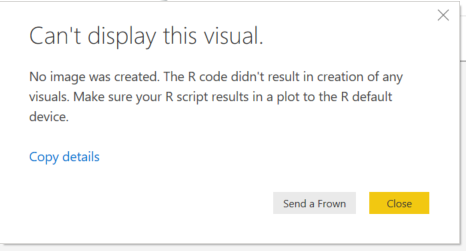
However, when I run this in the R script editor in Power BI, I get the following error message
Capture.PNG
 
Formattable is on the list of supported R packages here: https://docs.microsoft.com/en-us/power-bi/service-r-packages-support
 
I'm running R version 3.5.0 (2018-04-23) and Power BI Desktop version 2.70.5494.562 64-bit (June 2019)
 
I would like to be able to use the formatting functions in the formattable library to create a custom table visualization for my Power BI dashboard. Any help is appreciated!
 
Thanks!!
1 ACCEPTED SOLUTION
v-diye-msft
Community Support
Community Support

Hi @nxa03tm ,


This is know issue in R and not related to PBID directly. R does not have support of exporting these graphs to graphic devices such as svg, png and even pdf.


in PBI we support png graphic device.


to export graph to png please follow this : https://github.com/rich-iannone/DiagrammeR/issues/133 (png file name should be '001.png')


Best regards,
Dina Ye

Community Support Team _ Dina Ye
If this post helps, then please consider Accept it as the solution to help the other members find it more
quickly.

View solution in original post

1 REPLY 1
v-diye-msft
Community Support
Community Support

Hi @nxa03tm ,


This is know issue in R and not related to PBID directly. R does not have support of exporting these graphs to graphic devices such as svg, png and even pdf.


in PBI we support png graphic device.


to export graph to png please follow this : https://github.com/rich-iannone/DiagrammeR/issues/133 (png file name should be '001.png')


Best regards,
Dina Ye

Community Support Team _ Dina Ye
If this post helps, then please consider Accept it as the solution to help the other members find it more
quickly.

Helpful resources

Announcements
Join our Fabric User Panel

Join our Fabric User Panel

Share feedback directly with Fabric product managers, participate in targeted research studies and influence the Fabric roadmap.

February Power BI Update Carousel

Power BI Monthly Update - February 2026

Check out the February 2026 Power BI update to learn about new features.

FabCon Atlanta 2026 carousel

FabCon Atlanta 2026

Join us at FabCon Atlanta, March 16-20, for the ultimate Fabric, Power BI, AI and SQL community-led event. Save $200 with code FABCOMM.