Join us at FabCon Atlanta from March 16 - 20, 2026, for the ultimate Fabric, Power BI, AI and SQL community-led event. Save $200 with code FABCOMM.
Register now!The Power BI Data Visualization World Championships is back! Get ahead of the game and start preparing now! Learn more
Dear all,
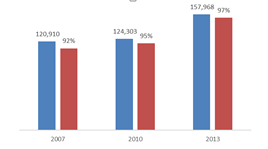
I am working to make my chart like this. The one column shows the total number and the another shows the Percentage. One column is related to another. For eg. In first column there is the total number and in another column you can see the 92% which is related to first column. How can I make this in Powr BI?Thanks in Advance.
Sincerely,
Aakesh.
Hi @Aakex,
I'll suggest you use a "line and stacked / clustered column chart" instead. I've been where you are before and adding the same value to both column and line (displaying one of them as "Percent of grand total" or creating a measure) worked for me. You'll need to play a bit with the data labels to don't get it messy.
I hope it helps.
Thank You! 🙂
Hi Aakesh,
If my answer was satisfactory, could you mark it as it? Thank you!
The Power BI Data Visualization World Championships is back! Get ahead of the game and start preparing now!
| User | Count |
|---|---|
| 40 | |
| 35 | |
| 34 | |
| 31 | |
| 28 |
| User | Count |
|---|---|
| 136 | |
| 102 | |
| 68 | |
| 66 | |
| 58 |