Join us at FabCon Atlanta from March 16 - 20, 2026, for the ultimate Fabric, Power BI, AI and SQL community-led event. Save $200 with code FABCOMM.
Register now!Learn from the best! Meet the four finalists headed to the FINALS of the Power BI Dataviz World Championships! Register now
In the following table as example :
Table1
| column |
| -1,14 |
| -0,07 |
| 0,67 |
| 1,00 |
| -2,77 |
which format string should be used to get this result:
| column |
| -1,14% |
| -0,07% |
| 0,67% |
| 1,00% |
| -2,77% |
(',' is for decimal number -2,77 =-2.77)
I know there are other ways in tabular to do this but I should do this with Format function.
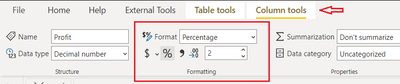
One solution is to change the column to percentage directly from DATA >>Column Tools >> Formatting.
you can also format your column using DAX
Column = FORMAT(DIVIDE(Sheet1[Profit],10000),"percent")
And if you want to convert "," to "." then use the following DAX, and to convert it into percentage use the above steps.
column = SUBSTITUTE(Sheet1[Profit],",",".")
@Anonymous
In our example both numbers have "," Do you need to convert to "," or "."
⭕ Subscribe and learn Power BI from these videos
⚪ Website ⚪ LinkedIn ⚪ PBI User Group
I need to convert to ','(as example shows) . I only wanted to be clear 🙂
@Anonymous
Not quite clear about what you are trying to do but add the following column to convert :
Column = SUBSTITUTE(SUBSTITUTE(Table2[Column1],",","."),"%","") /100
⭕ Subscribe and learn Power BI from these videos
⚪ Website ⚪ LinkedIn ⚪ PBI User Group
@Fowmy I get this:
As I mentioned I want to use Format function with a string of # and 0. I've tested different type of string like "#0,00%" (it's just an example) but don't get what I want.
I am still confused about the what you exactly need. Your locale is different from mine too.
refert to: https://dax.guide/format/
⭕ Subscribe and learn Power BI from these videos
⚪ Website ⚪ LinkedIn ⚪ PBI User Group
Share feedback directly with Fabric product managers, participate in targeted research studies and influence the Fabric roadmap.
Check out the February 2026 Power BI update to learn about new features.
| User | Count |
|---|---|
| 53 | |
| 52 | |
| 39 | |
| 15 | |
| 15 |
| User | Count |
|---|---|
| 94 | |
| 81 | |
| 34 | |
| 29 | |
| 25 |